

Last update:
Administrative and business personas
Aug 21, 2026
The Aikyam Identity Console enables self-service and delegated administration by establishing two primary user personas: AIC Administrators and Application Advocates. It includes four distinct roles for administrators and two for business advocates.
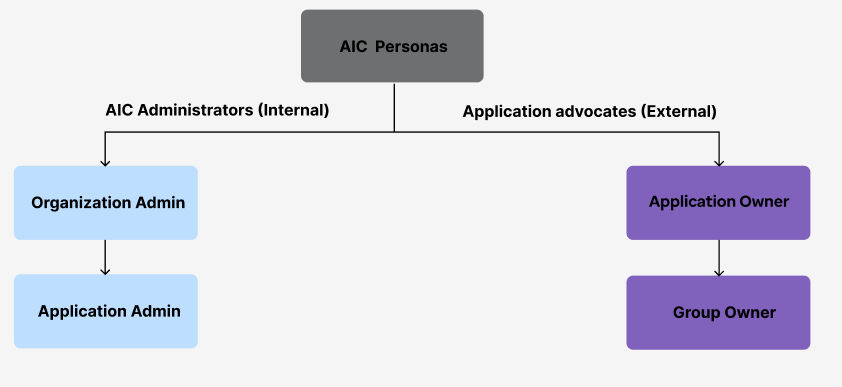
Each persona is assigned distinct responsibilities and granted specific privileges aligned with their administrative workflows — ensuring secure, efficient, and role-appropriate access management across the organization.
Administrators
AIC Administrators oversee organization-wide identity and access management (IAM), enforce security policies, and manage user provisioning.
Personas | Description |
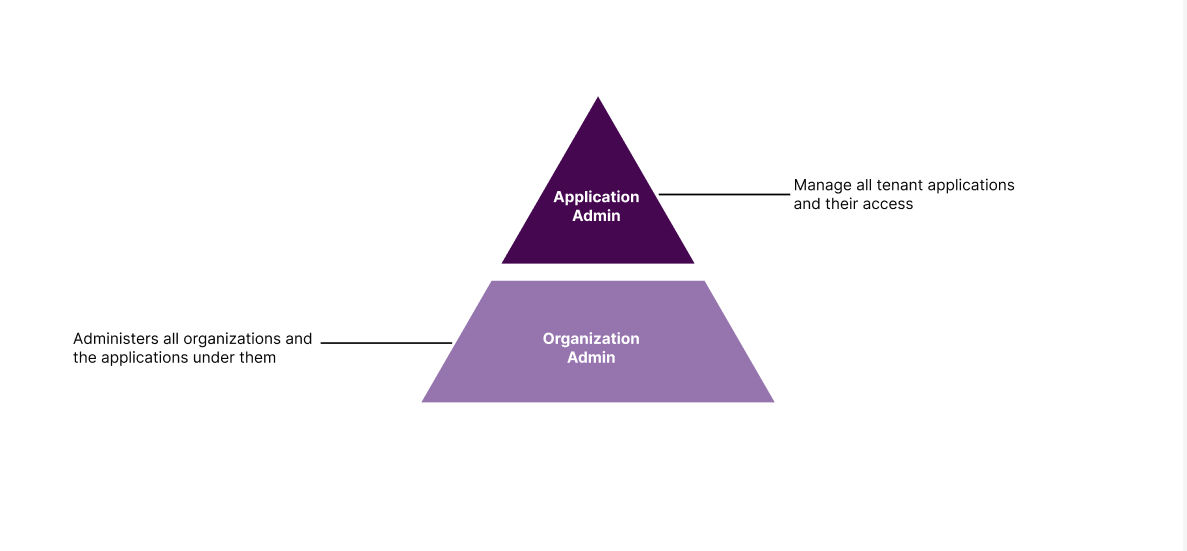
Organization administrator | They can access all organizations and applications within a specific tenant.
|
Application administrator | An application administrator has management access to all applications within the tenant.
Note: They don't have access to the Organizations and Security tabs. |
Application Advocates
Application Advocates manage application and group-level access within their scope, enabling decentralized management without needing deep technical expertise.
Personas | Description |
Application owner |
|
Group owner | The Groups owner is assigned by the application owner. They are entitled to manage user access within the group by:
Note: Based on the policy defined for the group, once a role is assigned to a group, all users within the group will be entitled to that role if the policy is active. If the role is removed, all users in the group will no longer have the said role. |
Previous:
Aikyam Identity Console overview
Next:
Get started
Share additional feedback to help us improve.
0/255
|
Powered by Aikyam @2025 All rights reserved

+1 866 451 2735
 +1 866 451 2735

+1 855 819 5909