

Last update:
OpenID Connect endpoints
Aug 21, 2026
Note: When those endpoints are called, please follow the instructions in Preparation for the future investigations section.
OIDC token (access, refresh, ID token) retrieval
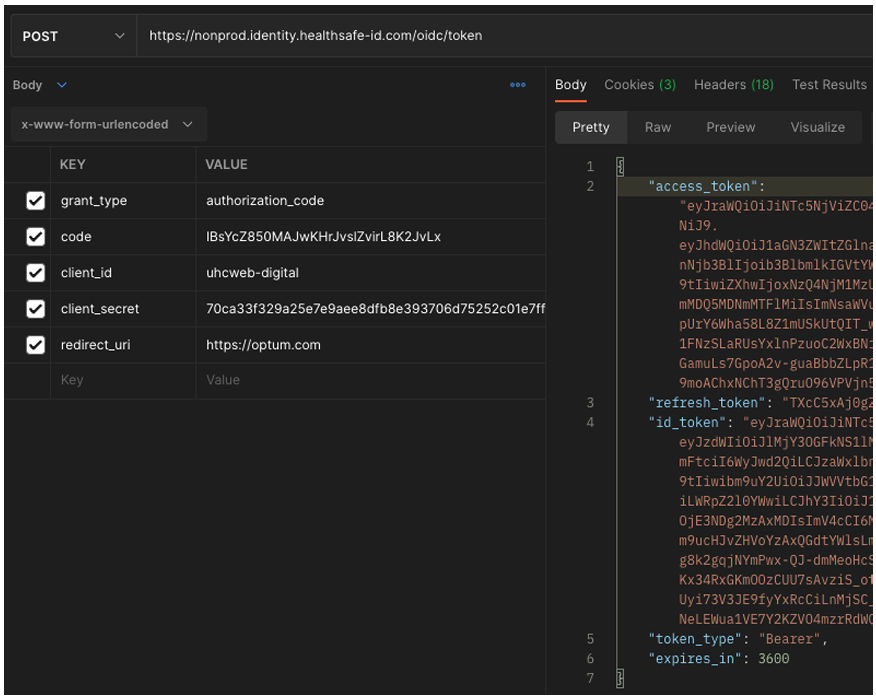
Client application makes a call to token server with client id, secret and authorization code to receive the ID token, access token and refresh token.
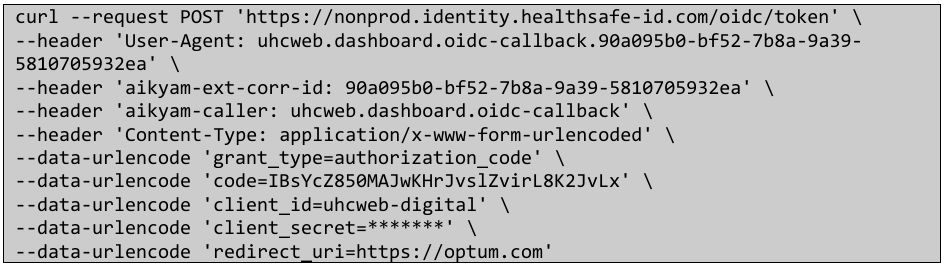
Request
- If Client authentication has failed, 401 unauthorized status code will be received in response.
- If authorization code is invalid or expired – a 400 bad request status code will be received in response.
- If redirect_uri parameter value is not identical to the redirect_uri parameter value that was included in the initial Authorization Request – a 400 bad request status code will be received in response.
Response
- Access token A token generated by OpenID Connect Provider and returned to a client application which the client application can use to access UserInfo endpoint or other Resource Servers (aka API) on behalf of end user. It is typically valid for 30 min for Healthsafe ID applications.
- Refresh token Additional token generated by authorization server which can be used by client application to refresh and obtain new access token when previous token expires. Typically access token has short lifeline as they spend more time on user-agent and can be stolen, a refresh token should never be revealed to user-agent and will have a longer lifespan than access token and is used by client application server-side components to obtain a new access token by interacting with authorization server. This limits the risk of a stolen access token in extreme cases. It is typically 8 hrs. validity.
- ID token A Json web token (JWT) which is returned by OpenID Connect which contains the identity claims about the end-user. This is typically valid for 5 min.
For more details refer https://openid.net/specs/openid-connect-core-1_0.html#TokenEndpoint
ID token signature verification
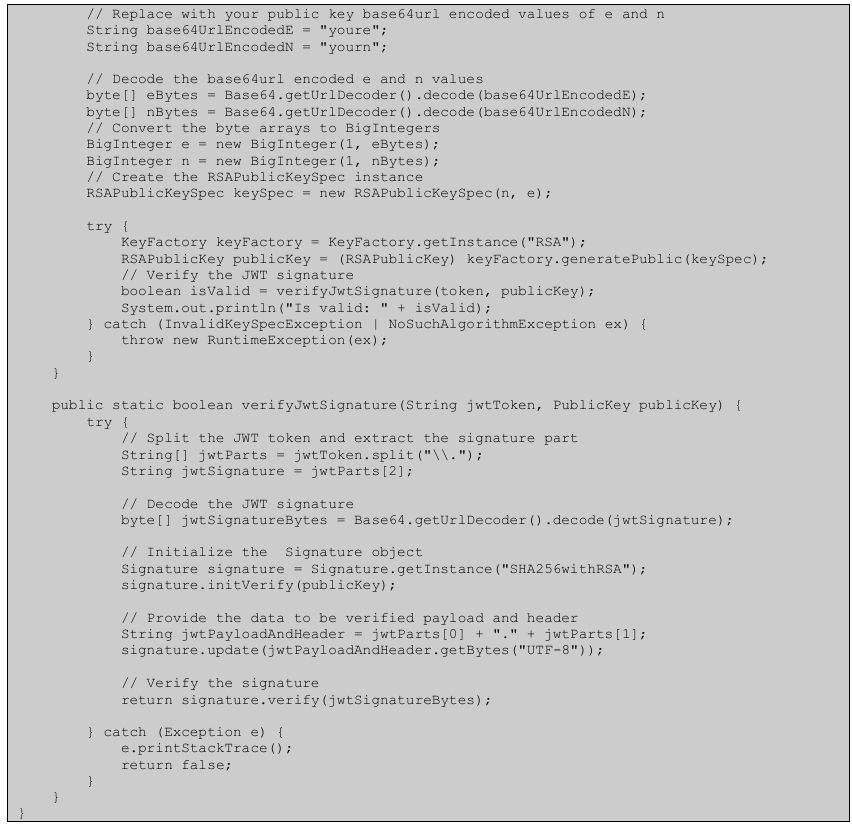
After receiving an ID Token (JWT), the Client application must verify the signature on it before using it. Below is sample code using following dependency to verify signatures. Readers can choose their choice of approved JWT verification toolkit, below is just a sample and not a recommendation.
Available public keys for ID Token verification are retrieved from the URL (jwks_uri in OpenID Connect Configurations) below, and the received ID Token contains kid claims in the header, that should match one of the available public keys. https://nonprod.identity.healthsafe-id.com/oidc/jwks
It’s worth noting that this code sample is Java code snippet to verify a JWT signed with RS256 using a public key. 
OIDC jwks_uri response (JWK Set) caching
Aikyam EDA rotates JWK Set used for ID token verification, following OIDC standard. Retrieving JWK Set for every ID token verification is excessive, and caching JWK Set is recommended, with the following rules:
- When ID token is expired, there is no need for ID token verification, therefore there is no need to refresh the cache.
- When Client (Portal) sees an unfamiliar kid value in unexpired ID token, re-retrieve JWK Set by calling jwks_uri and refresh the cache.
- Re-retrieval of JWK should not be excessive, even it hits this “unfamiliar kid” case. In general, key rotation happens every 24 hours when needed. Therefore, it is unlikely for the Client to see an unfamiliar kid value within 24 hours after the cache refresh, unless ID token is tampered and used for some attacks. At least, minutes of interval could be added if the cache is refreshed recently.
- The natural cache expiration logic can be added. The expiration time would be 24 hours or less, considering the key rotation period mentioned above.
- “unfamiliar kid” cache refresh case could be monitored and logged, to see if it is happening with an unexpected rate or not. (If it happens too frequently, it would be some issues)
ID token content validation
To see the content of a JWT ID token, you can decode it using various methods. A JWT is composed of three parts: the header, payload and signature, each separated by a dot (.). The payload contains the claims, which is the part we are interested in viewing. Below is an example of using command line using the ‘tr’ / ‘base64’ / ‘jq’ on Mac or Unix to decode base64-url JWT payload. 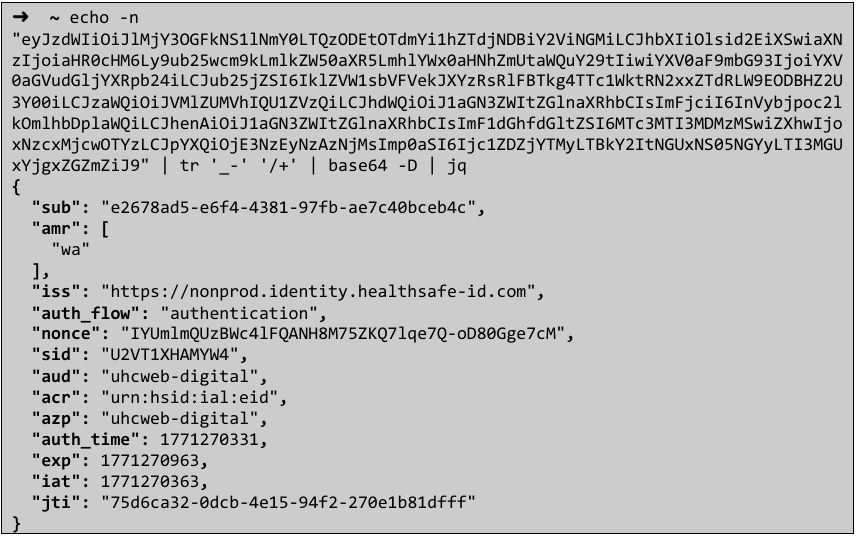
Token validity implementation must satisfy following specifications
- Time validity
- "exp" (Expiration time) claim: token MUST NOT be accepted on or after any specified exp time.
- "nbf" (Not before) claim
- OIDC ID Token verification specification
On completion of all successful validation of ID Token, client application can extract claims from ID Token and start its own loosely coupled application session and render application specific content to user.
Note: All of these (timestamp related) claims are optional as per specification, however when present in ID Token, they must be validated against so implementation must follow a null-safe pattern without making any mandatory assumption at code-level if a particular claim would be present or not.
Revoking token
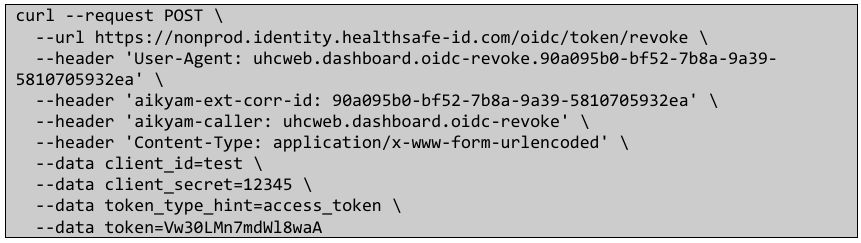
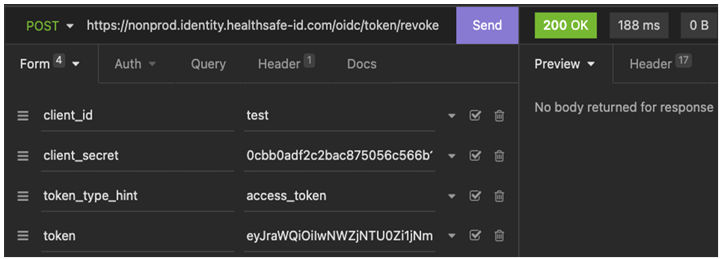
To revoke the token, you can use the endpoint https://nonprod.identity.healthsafe id.com/oidc/token/revoke and pass the parameters client_id, client_secret, token_type_hint = access_token or refresh_token, and token in POST We can revoke both access_token and refresh token using this API.
Refreshing a token
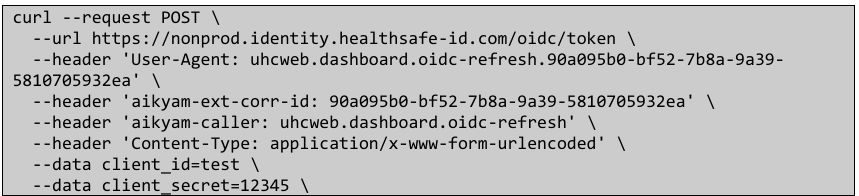
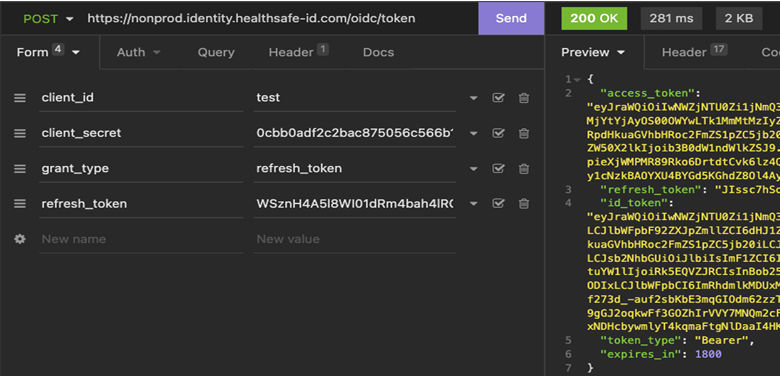
When an access token obtained by client application has expired, client application can utilize "refresh token” To obtain a new access token. Client application can make a HTTP Post request (from server side – aka not from browser as this request requires passing client secret) at OpenID Connect/OAuth token server to obtain a new access token. Parameters will be client id, client secret, grant_type = refresh_token and refresh_token.
HTTP response code received on refresh token request | Description |
|---|---|
| 200 | Client authentication successful, refresh token is valid. Response contains new access token along with expires_in for the new token. |
| 400 | Bad request – implying either invalid or expired refresh token or one of the desired input parameters are missing in request. |
| 401 | Client authentication failure – invalid client_id or client_secret. |
Additional information:
- The response payload contains a new refresh token. Client application must re-store this new refresh token for another access token refresh token endpoint call in the future.
- There is no restriction to how many times a client application can call token endpoint to refresh access token. However, new refresh token will have the same absolute expiration timing as the original refresh token (i.e. calling token endpoint does not extend the absolute expiration timing of the refresh token, for security reasons).
- As a best practice – client application should use refresh token only when the previously obtained access token has expired.
- The “expires_in” for access token obtained from the use of refresh token will mostly be same as the original access token obtained – however it’s advisable for client application to be dynamic enough and read the “expires_in” value every time a new access token is obtained and accordingly schedule the refresh task.

Validating a token
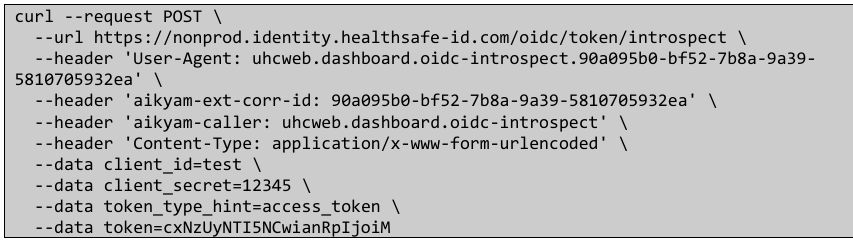
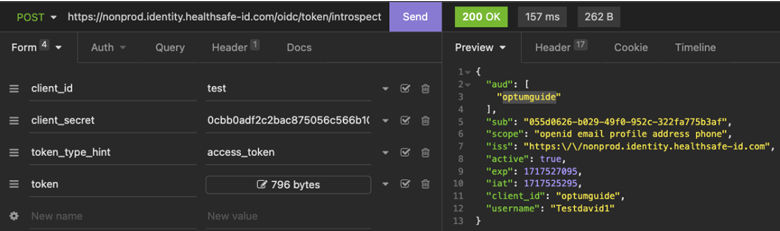
To check validity of the token, you can use the endpoint https://nonprod.identity.healthsafe-id.com/oidc/token/revoke and pass the parameters client_id, client_secret, token_type_hint=access_token and token in POST.
This validation is generally done by the resource server, where the user accesses their resource through applications. The application passes access token as Authorization header (bearer) together with the resource server endpoint call, and the target resource server is generally gated by the gateway server (e.g. Stargate), which does this introspection call, so that each resource server does not need to include this common introspection logic.
Here is the example of checking validity of an access_token.
HSID user profile information
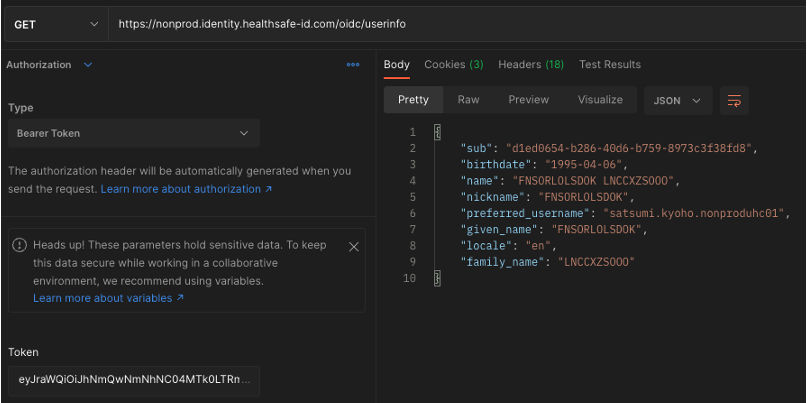
Once there is a valid access token, User Info can be extracted from the user info endpoint using a GET request as below. Client application may need more identity claims about the user that for security reasons weren’t provided by ID Token validated in Step #11. To achieve that, Client application can invoke a User Info endpoint on OpenID Connect Provider and include access token along with this request (It’s implementation specific whether access token will need to be supplied as a request parameter or in Authorization header, it is preferred to have Authorization header with Bearer token). The User Info endpoint will validate the access token and as per configurations will provide/return more identity claims about end-user to client application.
Note: Due to the recent security guidance from NIST, HSID recommends only “sub” claim retrieval from ID token, and rest of sensitive attributes retrieval from OIDC UserInfo endpoint. This is not strictly enforced yet, however, new applications and FAL2 required application should use OIDC UserInfo endpoint and will not get sensitive attribute claims in ID token.

Share additional feedback to help us improve.
0/255
|
Powered by Aikyam @2025 All rights reserved

+1 866 451 2735
 +1 866 451 2735

+1 855 819 5909