

Last update:
Application settings dashboard
Aug 21, 2026
The application configuration interface provides a centralized way to manage an application throughout its lifecycle. Once an application is registered, AIC administrators and application advocates can configure application settings, define access controls, set up authentication methods, enforce security policies, and align with compliance requirements.
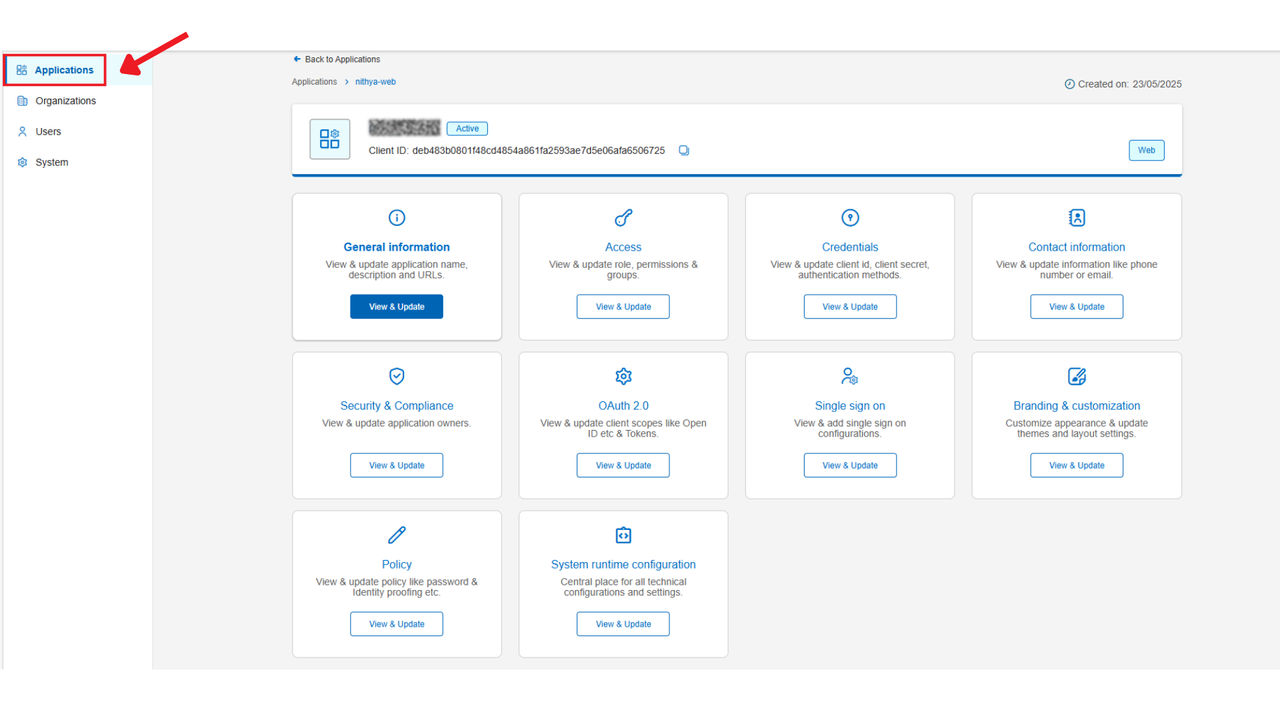
Based on the functionality, the tiles can be categorized under four broad sections:
- Configure application detailsThis section allows administrators and application advocates to define and update core application details, authentication methods, and security settings. Here are the tiles that enable application configuration:
- General Information: View and update application details, including Application Name, Display Name, Application ID, Line of Business, description, and URLs.
- Contact Information: Define contact support details.
- Security: Assign administrative privileges to the application owner for managing application.
- Configure credentials and authentication
- Credentials: Configure authentication settings, such as client secrets and security keys.
Manage identity protocols to define how users are verified and granted access to the application.- OAuth 2.0: Configure authorization settings, including Open ID and token management
- Single Sign-On (SSO): Set up and manage SSO configurations for authentication.
- Manage identity policies, branding and user self-service capabilities
- Policy: Define security policies, including password management and identity proofing.
- Branding & customization: This includes customizing the overall theme, setting up banner displays, and managing alert message configurations to align with your brand and user engagement strategy.
- Manage event notifications – Define event notifications for events such as invitation consumed, email updated, profile updated, and username updated
- Access management:Empowers application advocates with self-service capabilities to manage user access within the console.
- Access: Define and manage roles, permissions, and user groups to ensure fine-grained access management within the application.
Previous:
Manage application settings
Share additional feedback to help us improve.
0/255
|
Powered by Aikyam @2025 All rights reserved

+1 866 451 2735
 +1 866 451 2735

+1 855 819 5909