

Last update:
Configure OAuth2.0
Aug 21, 2026
To establish secure authentication and controlled access to user data, configure the OAuth 2.0 settings for the application in the Aikyam Identity Console. This involves two key steps:
- Configure authorization code: Grants & tokens Define how Authorization grants, client credentials and tokens are issued, signed, and validated.
- Configure scopes: Define the exact user attributes and permissions the application is allowed to request.
Configure Grants & tokens settings
Steps
To configure the OAuth 2.0 settings:
- In the Grant type box, select the grant type from the following options:
- Authorization code: This is a mandatory grant type. The authorization server acts as a middle layer between the app and the resource, using identity domains for secure access.
- Client credentials: The client credentials allow the application to authenticate itself using machine-to-machine communication and request tokens for protected resources.Note: If you select this check box, the machine-to-machine scopes are listed in the Scopes tab.
- Refresh token:When the access token expires, the refresh token is used to get a new one. It ensures continued access to protected resources without requiring user interaction again. Refresh tokens are usually stored securely on the authorization server.
- Under the Authorization granttab, fill in the following fields:
- Authorization grant : Enter the number of days the authorization grant remains valid.Note: You can set a custom authorization grant lifetime, ensuring the grant's validity does not exceed 15 days.
- Access token Under the Access token section, set the following parameters:ParameterDescriptionDefault ValueAccess token typeSelect JWT or Referenced based on your token type.JWTAccess token signing algorithmSelect the desired signing algorithm. This defines the cryptographic method used to sign the JWT, ensuring its integrity and authenticity.RS256Access token signing algorithm key sizeSelect the appropriate key size. This defines the key length used for signing the token.2048 bitsAccess token validityEnter the token validity duration. This field specifies the token’s lifespan in minutes. Once expired, a new token must be obtained using a valid refresh token or new authentication grant.30 minutes
- ID token An ID token is a security artifact issued as part of the OpenID Connect (OIDC) authentication flow to verify the identity of the user. It contains claims about the identity of the authenticated user, such as the user’s name, email address, and the time at which they authenticated. They are digitally signed by the authorization server and are encoded as JSON Web Tokens (JWTs).For OHID applications:Under the ID token section, set the following parameters:ParameterDescriptionDefault ValueID token signing algorithmDefine the cryptographic algorithm used to sign the ID token.HS256ID token validityDefine the duration (in minutes) for which the ID token remains valid after issuance.30HSID AIC applications:Under the ID token section, set the following parameters:ParameterDescriptionDefault ValueID token signing algorithmDefine the cryptographic algorithm used to sign the ID token.HS256ID token validityDefine the duration (in minutes) for which the ID token remains valid after issuance.5Default ACRThe acr claim in OpenID Connect is optional by default. It is only included in the ID token if:
- The client requests it using the
acr_valuesor claims parameter, or - The identity provider is configured to always include it.
If not explicitly requested or configured, the acr claim may be omitted from the ID token.For EDA Unmatched:urn:hsid:ial:oneFor EDA Hybrid:urn:hsid:ial:eidFor EDA Matched:urn:aikyam:aal:mfa. - The client requests it using the
- Refresh token Under the Refresh token section, set the following parameters:
- Refresh token type: Default. This is the standard type of refresh token issued by the authorization server.
- Refresh token validity: 240 minutes. This means the refresh token is valid for 240 minutes before it expires.
For HSID applications:Besides the two fields discussed earlier, HSID also requires Token Introspection Response Mapping. This feature enables the client application to understand and process the token introspection response according to specific business needs. - Subject type
Under the Subject type section, set the following parameter:- Subject type: Public. This indicates that the subject identifier (user ID) is public and can be shared across various clients.
- Authorization grant : Enter the number of days the authorization grant remains valid.
- Click Save.
Configure scopes
Scopes define what the application can request regarding user details in relation to the service.
Steps
- Sign in to the Aikyam Identity Console.
- In the left navigation pane, select Applications. Alternatively, you can select View Applications tile on the Dashboard.
- Select the application you want to configure.
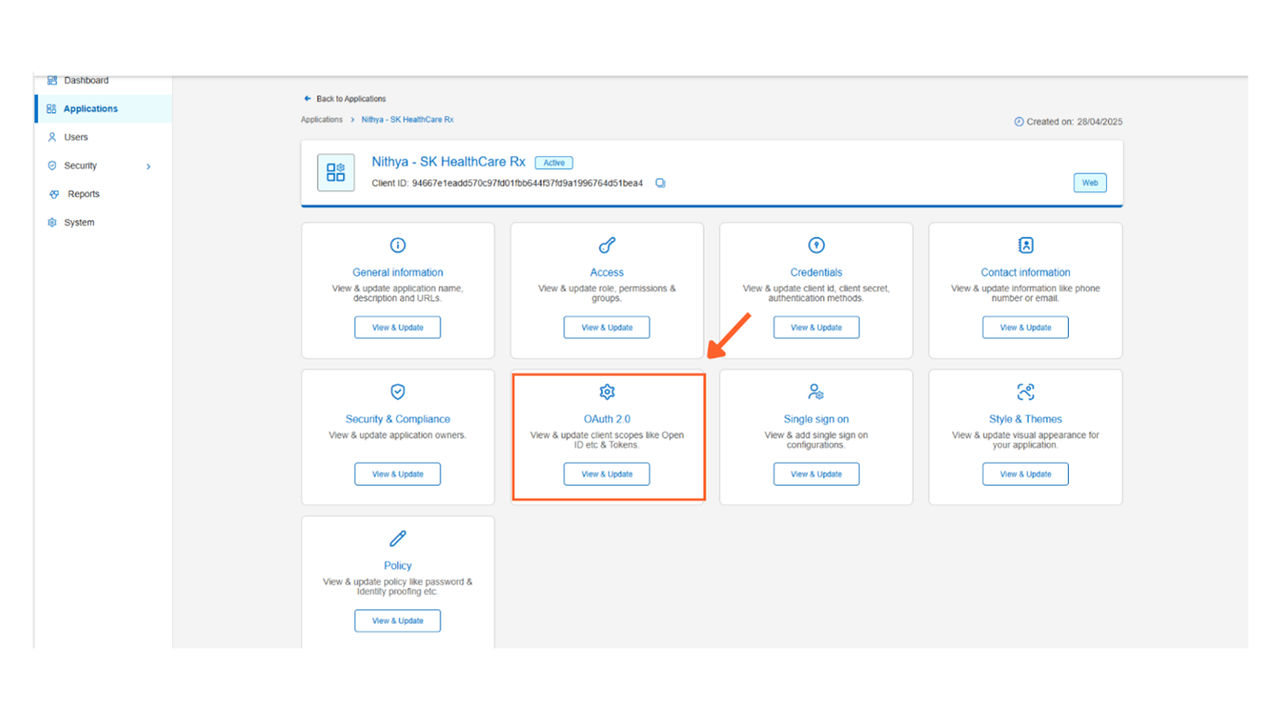
- Go to the OAuth 2.0 tile and click View & Update to open the side pane with two tabs:
- Grants & tokens
- Scopes
- Select the Scopes tab.Note: Review the list of available scope values and select the appropriate option.For OHID applications:Web-based application scopes:Below are the scopes you will see if your application is web-based, along with their descriptions for accessing user data:Scope nameDescriptionopenidIdentifies the request as an OpenID connect request.profileRequests access to the end user’s default profile claims such as first name, last name, gender, date of birth, locale etc.emailRequests access to the email address and email_verified claimsphoneRequests access to the phone number and phone number_verified claimsaddressRequests access to the address claimFederationCustom scope for SSO inboundx-logoutScope for custom logoutMachine-to-Machine (M2M) application scopes:Scope nameDescriptionurn:optum:oid:rest:invitationsAllows the application to manage invitations across Optum applicationsurn:optum:oid:scim:users:queryEnables querying user information using the SCIM2 protocolstargate-apiProvides access to the Stargate API for various data operationsaikyam.clients.readAllows reading client information within the Aikyam identity fabricaikyam.clients.managePermits managing client information within the Aikyam identity fabricaikyam.clients.deleteGrants the ability to delete client information within the Aikyam identity fabricauthz.api.manageEnables management of authorization APIs
- Click Save.
Share additional feedback to help us improve.
0/255
|
Powered by Aikyam @2025 All rights reserved

+1 866 451 2735
 +1 866 451 2735

+1 855 819 5909