

Last update:
PBIC during account recovery
Aug 21, 2026
The following describes the standard Phone‑Based Identity Confirmation (PBIC) recovery flow.
PBIC is used during supported account recovery scenarios across the Aikyam Identity Platform. Detailed end‑to‑end recovery journeys are documented separately and can be referenced from the One Healthcare ID Help Center..
This flow applies to both self‑service recovery and admin‑assisted recovery, depending on the tenant and use case.
Steps
- Account recovery is initiated and recover via Phone‑Based Identity Confirmation is selected.
- The user initiates account recovery and selects Recover via Phone‑Based ID Confirmation.
- The user provides the following identifying information:
- First name
- Last name
- Date of birth
- Phone number
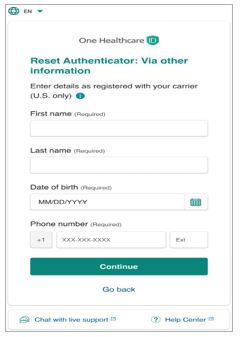
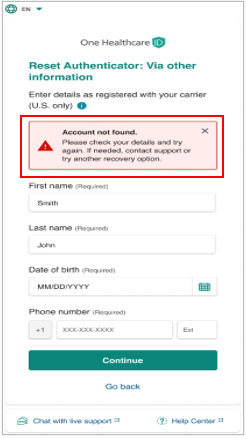
- The system attempts to locate the user account using the provided information.
- If no matching account is found, an “Account not found” message is displayed.
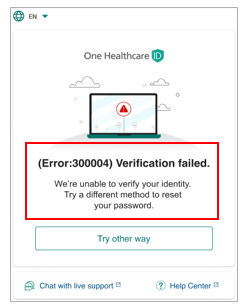
- If the entered phone number does not match the identified user account, a “Verification failed” error message is displayed.
- If no matching account is found, an “Account not found” message is displayed.
- If a matching account is found, the PBIC verification process is initiated.
- A one‑time verification code is sent to the provided phone number via:
- SMS, or
- Voice call
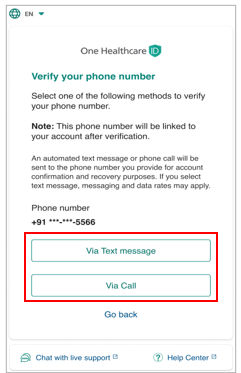
- Background risk assessment is performed as part of the PBIC verification process.
- If PBIC verification succeeds:
- The recovery flow is allowed to proceed.
- The verified phone number is saved to the user profile if it differs from the existing value.
- If PBIC verification fails:
- An appropriate error message is displayed.
- The recovery process may be restarted, or an alternative recovery option may be selected, where available.
Previous:
Account recovery scenarios
Share additional feedback to help us improve.
0/255
|
Powered by Aikyam @2025 All rights reserved

+1 866 451 2735
 +1 866 451 2735

+1 855 819 5909