

Last update:
Invitation API integration
Aug 21, 2026
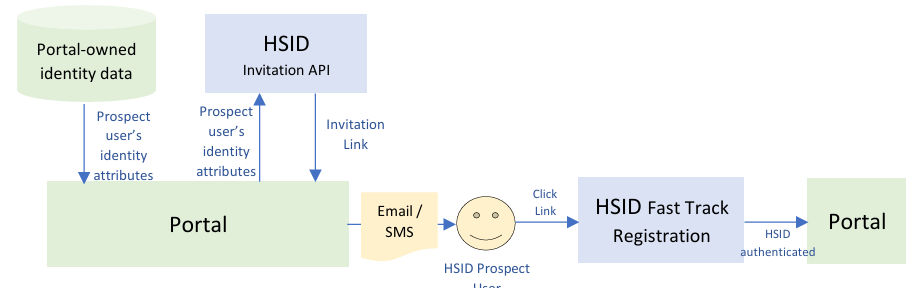
API is exposed through Aikyam Service Gateway and portal team needs to make a request to HSID team to enable access to the API. Portal or application should be already onboarded on HSID.
Sections below are the prerequisites to integrate the API, for Matched or Unmatched Fast Track Registration use cases.
Matched fast track registration
- Portal team needs to share user information including big 4, which will be passed by portal as a request to the API. This information includes first name, last name, phone number (mobile or landline), date of birth, identifier, optionally assigningAuthority (when identifier is Optum Care identifier).
- Valid phone number is required for the “Two-Step Verification” performed during the fast track registration process.
Unmatched fast track registration
- Portal team needs to share user information, which will be passed by portal as a request to the API. This information includes first name, last name, phone number (mobile or landline), date of birth (depends on portal configuration).
- Valid phone number is important for the “Two-Step Verification” performed during the fast track registration process.
API endpoints
| Environment | API URL | Token URL |
|---|---|---|
| Non-prod | https://api.nonprod.identity.healthsafe id.com/api/v1/invitations | https://nonprod.identity.healthsafe id.com/oidc/token |
| Production | https://api. identity.healthsafe id.com/api/v1/invitations | https://identity.healthsafe id.com/oidc/token |
Recommended call volume
Calling Invitation API with a very high frequency / many parallel threads will stress Aikyam HSID platform and end up with error responses on Client / Portal side. Below is the recommendation of the volume for different use cases.
- One time (account migration, email marketing campaign for very large audience, etc)
- Coordination with HSID team is required. Please reach out to HSID Tech Product Manager for the details.
- Upper limit
- Matched: 250 link generation per second per Application / Portal
- Unmatched: 300 link generation per second per Application / Portal
- Recurring (scheduled email marketing campaign, advocate / call center registration support)
- Please describe the calling pattern / scheduling in the HSID onboarding document.
- Recommended limit
- Matched: 25 link generation per second per Application / Portal
- Unmatched: 30 link generation per second per Application / Portal
Get access token (Matched / Unmatched FTR)
- access token validity depends on the client configuration. The default expiration is 60 mins.
- After the expiration, Client application needs to call this endpoint again to get a fresh token, then it can continue Invitation API call with a fresh access token.
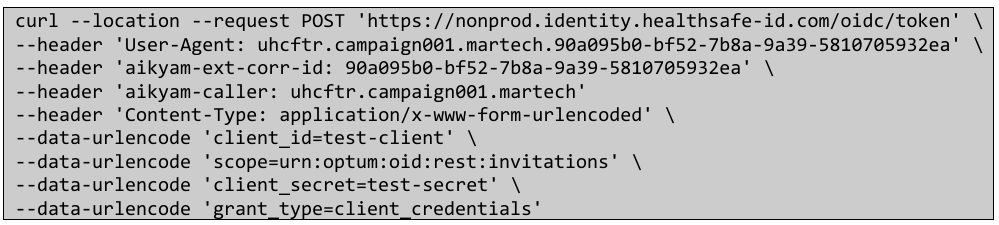
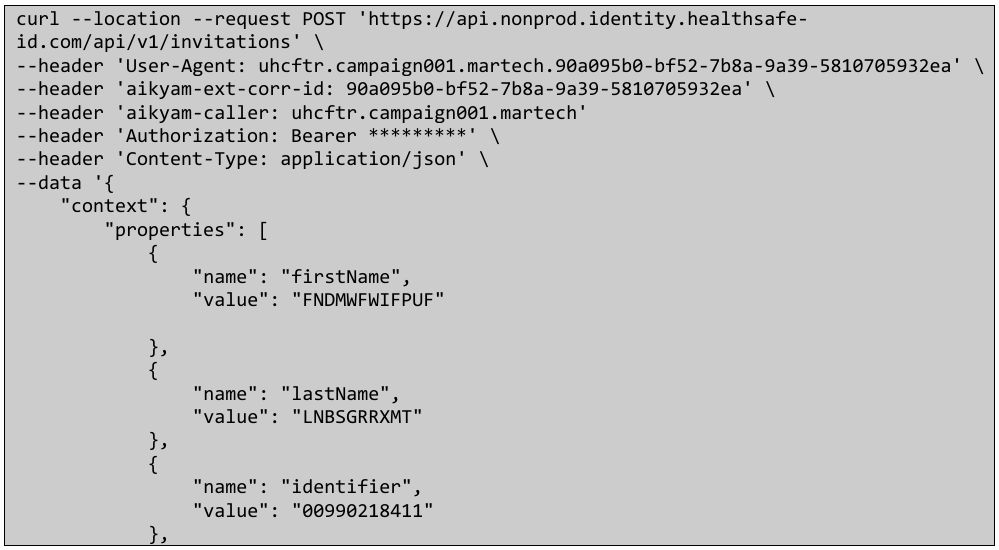
Sample request (Matched FTR)
- All fields are mandatory except language, email_address, expiration_date & expiration_time.
- Access token generated in first step needs to be passed in header as Bearer .
- context.properties:
- firstName / lastName: first name / last name that should be used for the registration.
- identifier: one of EiMP search_key identifiers, or medical record number paired with assigningAuthority (see below).
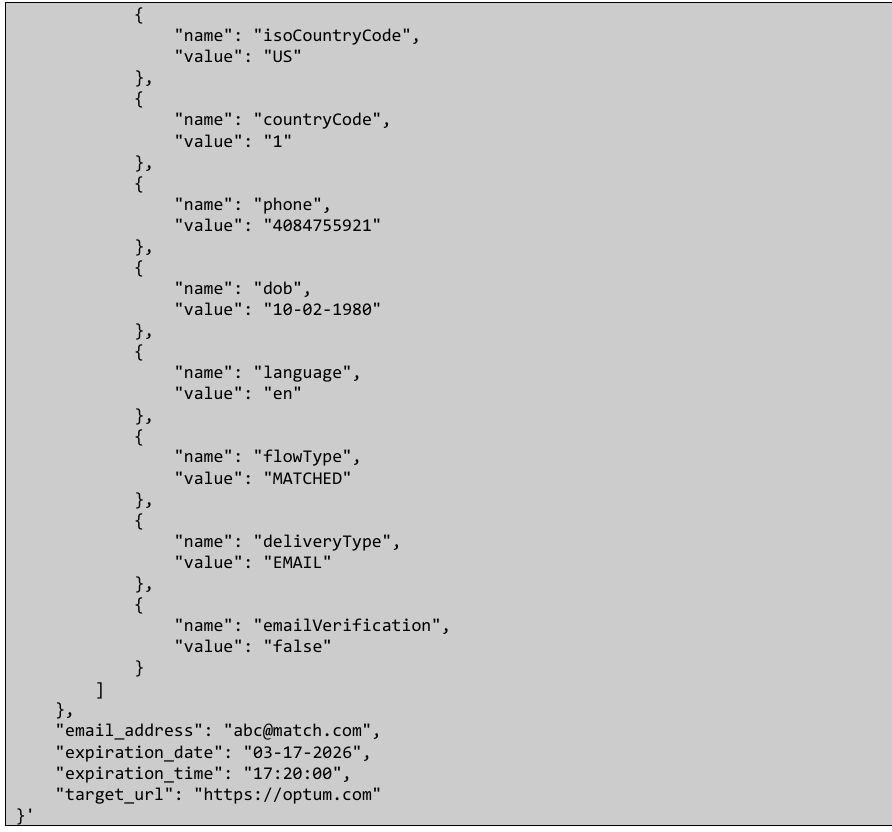
- isoCountryCode / countryCode / phone: phone number’s ISO 3166-1 alpha-2 country code, phone country code, rest of phone number (number only).
- dob: date of birth that should be used for the registration. MM-dd-yyyy format.
- assigningAuthority (optional): For Optum Care portals, if “identifier” is a Optum Care identifier (medical record number), Patient Assigning Authority is required (a.k.a. OID).
- language (optional): ISO 639-1 language code, default “en”.
- flowType: MATCHED
- deliveryType (optional): The delivery type of this invitation link. The possible values are below, if this property is not included or empty or whitespace, the default value is EMAIL.
- EMAIL : sent by email (default)
- SMS : sent by SMS
- OTHER : sent by other method
- emailVerification (optional): This property only matters when email_address below is provided and deliveryType is EMAIL. When both conditions are satisfied, email OTP verification can be skipped and auto-verified due to the fact that the user clicked the link in the email whose address is used for the link delivery. Under these conditions, if this property is not included, empty, whitespace, or random string (not “false” or “true”), the default value is false.
- false : email OTP verification is skipped and marked as verified(default for email_address provided and deliveryType=EMAIL conditions) : email OTP verification is required
- true : email OTP verification is required
Note:- When deliveryType is SMS / OTHER, or, email_address is not provided, then this property does not matter, email OTP verification is strictly required.
- false / true is JSON string property, same as other context.properties JSON attributes (see the example below).
- false : email OTP verification is skipped and marked as verified
- email_address (optional): if it is present, the user will be directly shown with verify email screen, otherwise has to set-up email address and then verify.
- expiration_date (optional): it sets the date on which the invitation link will expire. format: mm-dd-yyyy UTC. max: 72 hours (3 days) from creation, default: 72 hours if not specified; the link becomes invalid after that.
- expiration_time (optional): it sets the exact time at which the invitation link will expire. format: HH:mm:ss UTC. max: 72 hours from creation, optional: defaults to UTC 23:59 for matched flow if not provided, limit: if expiration_date + expiration_time exceeds 72 hours, expiration is set to 72 hours from creation, if expiration_time is provided without an expiration_date, the creation date is used; the link becomes invalid at the specified time.
- target_url: Portal’s URL where the user is redirected to, after Fast Track Registration. This URL should start OIDC, and navigate the user to the desired final destination after the OIDC.
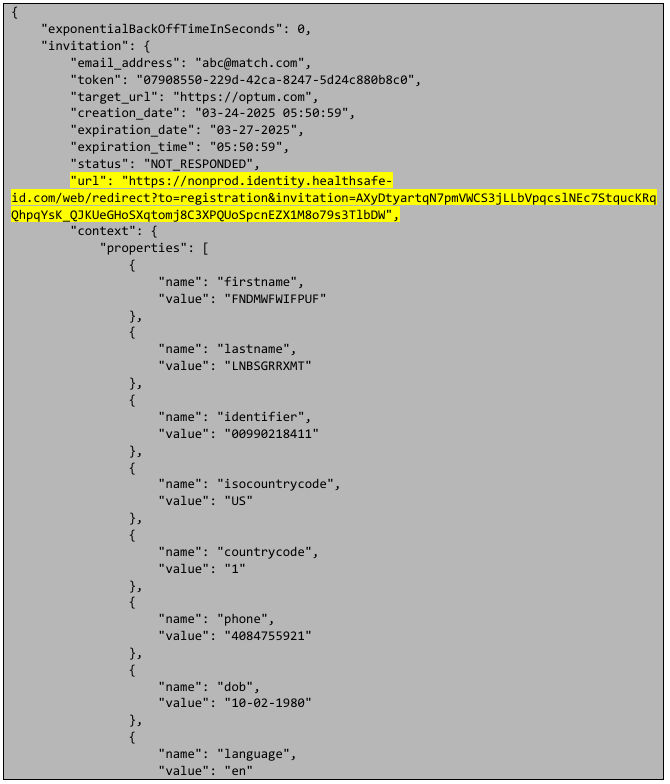
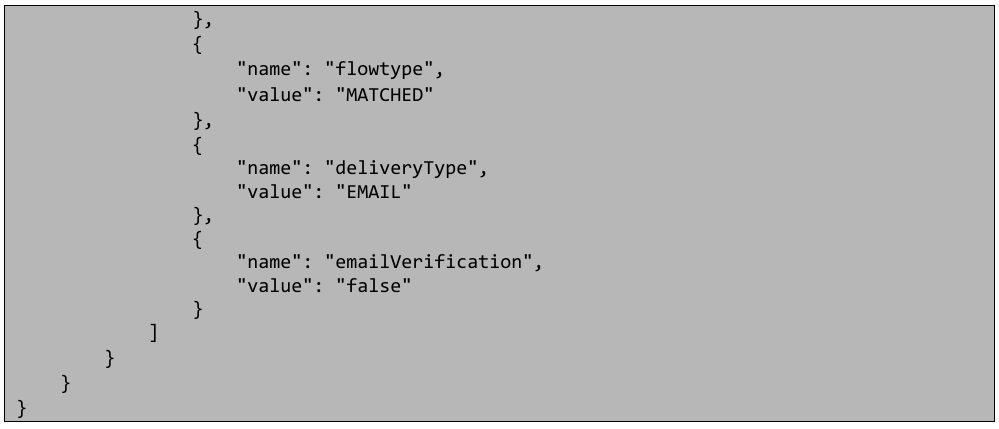
Sample response (Matched FTR)
- URL highlighted in the response below needs to be sent in email/sms.
Sample error response (Matched FTR)
- Golden Record does not exist with the provided attributes – 400 Bad Request

- Missing required attributes / wrong formatted or non-allowed value in the payload – 400 Bad Request

- Non-registered target URL domain – 400 Bad Request

- HSID account already associated with the identified golden record – 400 Bad Request

- The provided email already exists in the system (taken by another account) – 400 Bad Request
 Note: This error message is applicable for both MATCHED and UNMATCHED flowType, but not for PR flowType (PR flowType omits this check and allows to generate a link, and the email uniqueness is checked when the link is clicked).
 - Invalid or expired bearer access token – 401 Unauthorized

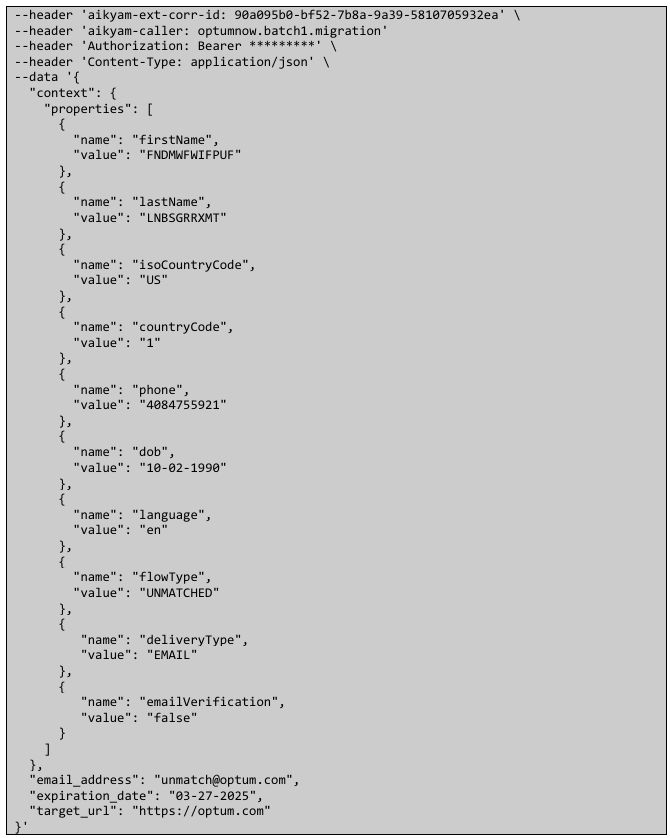
Sample request (Unmatched FTR)
- All fields are mandatory except language, email_address, expiration_date & expiration_time.
- Access token generated in first step needs to be passed in header as Bearer .
- context.properties:
- firstName / lastName / isoCountryCode / countryCode / phone / dob / language (optional) / deliveryType (optional) / emailVerification (optional): Please see “Sample Request (Matched FTR)” section above.
- flowType: UNMATCHED
- email_address (optional) / expiration_date (optional) / expiration_time (optional) / target_url: Please see “Sample Request (Matched FTR)” section above. For Unmatched FTR, maximum expiration is 90 days from creation date/time.

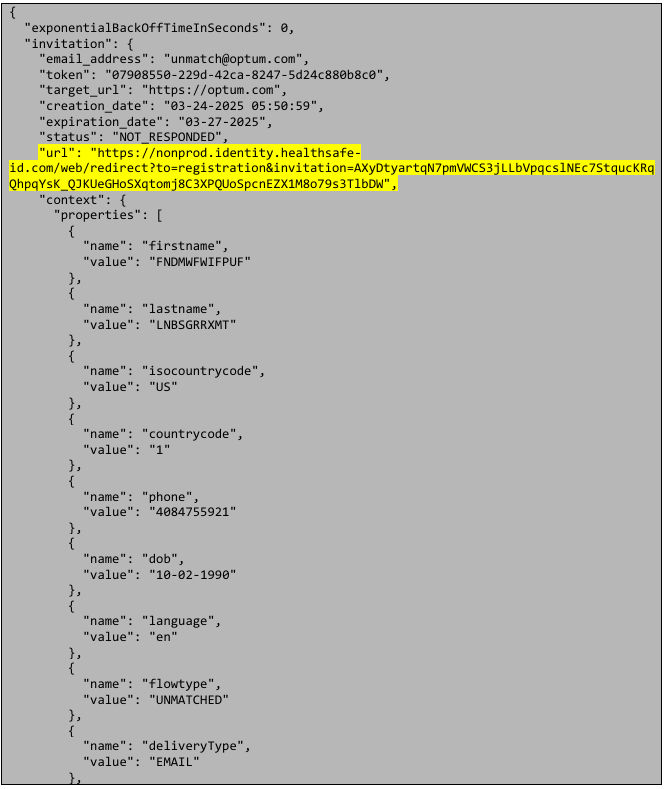
Sample response (Unmatched FTR)
- URL highlighted in the response below needs to be sent in email/sms.

Share additional feedback to help us improve.
0/255
|
Powered by Aikyam @2025 All rights reserved

+1 866 451 2735
 +1 866 451 2735

+1 855 819 5909