

Last update:
Get started - application integration sign-in
Aug 21, 2026
Sign-in
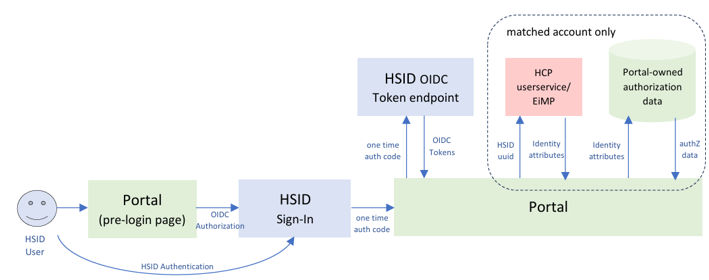
- User clicks on “Sign-in” button, that calls Portal-owned Target URL (e.g. https://portal.com/signin), then this call automatically makes a GET call (redirection) to HSID OIDC Authorization URL. The below is an example of HSID OIDC Authorization URL:https://nonprod.identity.healthsafe id.com/oidc/authorize?scope=openid+email+profile+phone&response_type=code&redirect _uri=https%3A%2F%2Fdummy.optum.com&client_id=eda-optum-theme-app web&ui_locales=en&state=XXXXXX Note: The example above uses https://dummy.optum.com as a redirect_uri, so that the tester can capture one time auth code (issued by HSID) easily. This one-time auth code is used to call OIDC Token endpoint subsequently (see above).
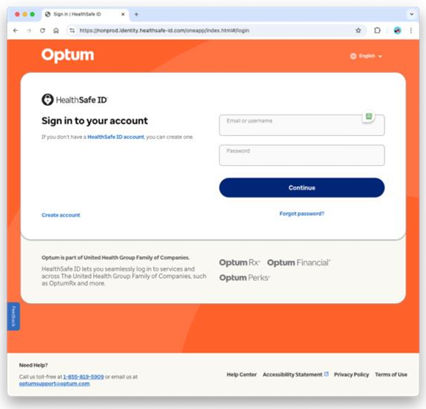
- After successful validation of client id, scopes and redirect URL and redirects to one of the Healthsafe ID login page on successful verification.
- After successful login, the authorization server redirects back to the redirect URL with an authorization code.
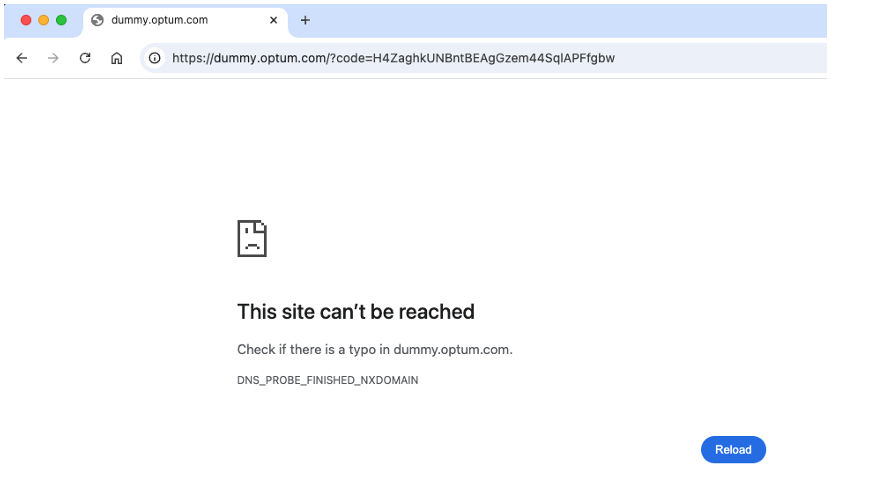
- This code is used to call OIDC Token endpoint to get OIDC tokens.For more details, please refer OIDC authentication request specification.
Using state parameter to control user’s landing location on portal
While state parameter is not strictly required by OIDC spec, it is useful for 1) prevention of Cross-Site Request Forgery and 2) the client application / portal to navigate the user to the specific client application / portal page after the OIDC process is done. Here is the guideline how to set up state parameter value, based on RFC 6749, RFC 6819 and RFC 9700.
state value should not be tampered or swapped; below is one of examples that is suggested in RFC 9700, using JWT. Instead of JWT, simple symmetric encryption could also be used with same type of contents.
- state value as signed / encrypted JWT or encrypted string contains below
- rfp: hash value of Portal-domain session-bound cookie (the original session cookie value cannot be retrieved from hash, it prevents from manual cookie swapping)
- target_link_uri: the destination information on the portal page after OIDC
- state validation upon callback
- Verify signature / decrypt JWT / decrypt string and follow standard JWT verification.
- Receive portal-domain session-bound cookie separately and calculate a hash value, compare with rfp claim.
- Once all validation is successful and OIDC process is done, redirect to target_link_uri
Passkey integration
HSID EDA is capable to provide passkey authentication to the users of your application, as one of authentication methods. Whether your application utilizes passkey or not is configured during the onboarding process.
The required passkey integration effort for the application owner depends on where HSID passkey authentication (HSID OIDC UI) is supposed to be executed.
| Device | Medium | Special implementation required? |
|---|---|---|
| Desktop | Web browser | No |
| Mobile – Android OS | External mobile browser | No |
| In-App browser (custom tab) | No | |
| Webview | Yes (see below) | |
| Mobile - iOS | External mobile browser | No |
| In-App browser | No | |
| Webview | No |
Note: As you see above, both Android OS / iOS do not require special implementation for In-App Browser, therefore HSID recommends that the mobile native application executes HSID EDA OIDC in In-App browser for general sign-in / registration purposes. However, there are cases that your Android mobile application opens a Webview and shows “other” HSID applications inside, and this “other” HSID application enabled passkey authentication. In this use case, Android mobile application owner is responsible for addressing this Android Webview workaround, because passkey authentication could happen in this Webview.
Android OS’s Webview Passkey Integration (“Yes” case above)
Android OS’s Webview does not have full WebAuthn (passkey’s base technology) support, therefore some workaround implementation is required to support passkey. For the details, please read this article (if you are not able to access this github document, please check this PDF version instead). In addition to the steps included in the article, two more set-ups below are required.
IdP (Aikyam HSID EDA) – Android OS Package name / Fingerprints registration
HSID EDA needs to register your app in the trusted application list. Please share the information below to HSID implementation team.
Android OS App – HSID EDA domain registration
Android OS App needs to register Aikyam HSID EDA hosted assetlink.json URL.
- Android manifest (inclusion of HSID EDA hosted assetlink.json URL)
Registration
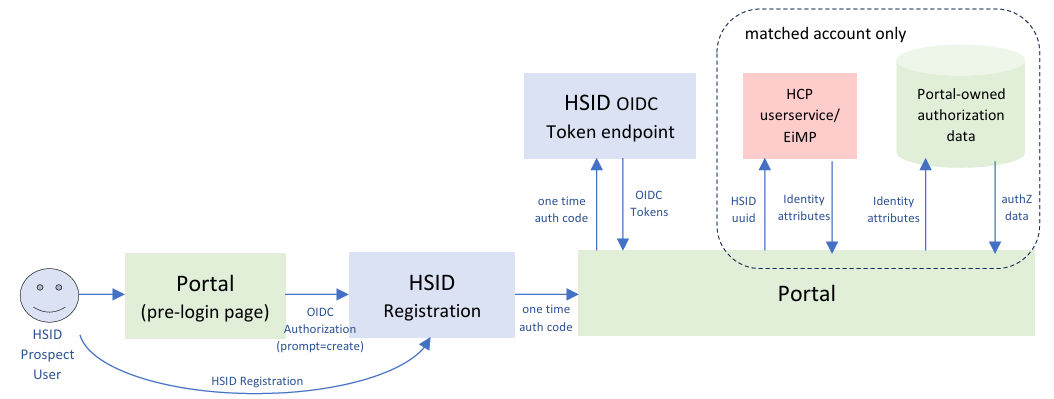
A relying party (“Portal”) may indicate that a user desires to create an account and should see the registration UX, rather than needing to first see the login page and navigate with the registration link. This is done by including prompt with a value of create.
After account creation and other steps (email verification, consent), the OIDC flow will be continued. For the Authorization code flow, the user will be redirected back to the relying party with an authorization code.
HSID account types
HSID has two types of accounts:
- HSID matched account
- HSID account owner successfully completed EiMP GR matching operation by providing their identifier (Member ID, SSN, Medicare Beneficiary Identifier, etc).
- This could happen at the time of HSID account registration, sign-in (to “matched” portal – see the next section), Portal initiated step-up (For hybrid portals), etc.
- HSID unmatched account
- Opposite of the above (HSID account owner hasn’t successfully completed EiMP GR matching)
Matched account is used when the portal needs to authorize the HSID account holder to use their application (a.k.a. “member experience”), by using EiMP Golden Record identity data and portal-owned authorization related data.
Unmatched account is used when the portal does not need authorize the HSID account holder. Also, unmatched account could be used temporarily, until the portal prepares EiMP Golden Record for this individual, and converts their unmatched account to matched account (see Portal initiated step-up (For hybrid portals)).
HSID registration portal / Application configuration types
HSID portal / Application can choose one from three types of HSID registration configuration:
- matched registration
- Registration flow asks EiMP GR identifier and matches with an EiMP individual (GR), and registers a HSID matched account associated with EiMP GR.
- unmatched registration
- Registration flow does not ask EiMP GR identifier and registers a HSID unmatched account without EiMP GR association.
- hybrid registration
- Registration flow asks EiMP GR identifier, but the user can “skip” the identifier input and registers a HSID unmatched account if needed. If the user is able to match with an EiMP individual, the user is registered as a matched account.
Which configuration to use should be discussed during the portal onboarding process.
This configuration also affects the behavior when HSID unmatched account tries to sign-in to the target portal / application. Matched registration portal shows “step-up” page (EiMP GR identifier input) to convert the unmatched account to matched account, before the user gets into matched registration portal. Hybrid registration portal also shows “step-up” page, however, the user can skip it, same behavior as at the time of the registration.
Non-prod registration test tips
EiMP Golden record preparation (HSID matched account only)
In order to register HSID matched account, non-prod EiMP Golden record needs to be prepared in advance, to have a successful EiMP GR match during the matched account registration process.
Generally, portal has its own way to prepare non-prod EiMP GR. User Lingo is one of the tools can be used to prepare EiMP Golden Record and also portal-owned authorization data.
Phone number
HSID registration requires Phone One Time Password (OTP) verification. In order to avoid using a real phone for every registration, non-prod environment allows to use Magic phone / Magic phone OTP. Phone number does not need to be unique per account, and this one magic number can be used for multiple account registrations.
HSID Registration requires a unique email address per account. Same as Phone Number, non prod environment allows to use Magic email / Magic email OTP. Magic email OTP value is the same as Magic phone OTP value (see the link above), as of Sep 2025.
The current (Sep 2025) HSID magic-email-qualified addresses are:
- <any_string>magic_email@mailinator.com
- <any_string>magic_email@sharklasers.com
To comply with the unique email constraint at the time of HSID account registration, select <any_string> that does not match with the existing emails in HSID non-prod environment. This is depending on the use case, if it is for the manual testing, you can find the unique string by try-and-error manner, assuming you want some easy-to-remember magic email address. If it is for the automated testing, you can use a randomly generated UUID, to avoid human intervention.
Please note that magic email addresses will not receive any emails that systematically sent from Aikyam HSID platform, including OTP. However, HSID email address is sometimes used by HSID applications, and there is no email delivery control on that part. If HSID application needs the strict email delivery control on this non-prod magic email address, HSID application itself can implement the logic on their application.
mailinator.com / sharklasers.com email accounts are publicly accessible, as long as the target email address is known. (therefore, uuid-prefixed magic email is unlikely to be accessed).
If you prefer using real email addresses to test Email OTP delivery, the following methods are recommended:
- Use a third-party email provider that uses email subaddress extension (a.k.a. plus ‘+’ addressing). With ‘+’ addressing, it helps create multiple HSID accounts with unique email subaddresses under one managed email account.
- Gmail
- Yahoo Mail
- Mail.com
- Use a third-party email provider that allows to create multiple email accounts.
Note: Accessing Webmail through UHG-network requires secure access request.
Next:
Multi-language support
Share additional feedback to help us improve.
0/255
|
Powered by Aikyam @2025 All rights reserved

+1 866 451 2735
 +1 866 451 2735

+1 855 819 5909