

Last update:
Fast track registration
Aug 21, 2026
This section outlines the significance of the Fast track registration feature in enhancing user experience and operational efficiency and evaluates the business value it brings with this integration.
Overview
Fast track registration, a feature designed to simplify and expedite user registration, is a digital transformation solution offered by the Aikyam platform. Any portal that secures access with HSID can leverage this feature to optimize the registration workflow.
Watch the fast-track registration experience in action:
Availability in Production/Launch date
- The Fast track registration feature with matched eligibility has been implemented in the HSID on-premises environment for the following portals: Optum Patient Portal, Optum Rx, and Optum Bank.
- The Fast track registration for unmatched eligibility for Optum Now was deployed to production in September 2024.
- EDA unmatched functionality is available for all existing unmatched portals using the EDA theme, while EDA matched functionality is live in production, although it is not currently in use by any portal.
Problem Statement
In the conventional registration process, inaccuracies in the information entered by members during the initial step led to challenges in matching and validating records within the eligibility system. This on-the-fly eligibility resulted in increased registration denials with some portals experiencing failure rates as high as 30-40%.
Fast Track provides a digital solution for registering with a 72-hour validity link instead of filling out the form. To address this challenge, the HSID provider has exposed an API through Stargate that processes Big 5 data and generates a Fast track registration link. When member clicks on this registration link in the email invite, HSID will retrieve the member’s information from the database
Initial Impacted Personas and LOBs
Impacted Personas | Line of business | Impacted Applications |
1. Members with active insurance plans | HSID | UHC, OptumRx |
2. Non-members Example: Customers of online pharmacy stores, who do not have active insurance plans | Optum Now |
Description
Let us explore the various flows implemented within the HSID tenant.
Fast track registration matched on-prem flow (Email):This flow is used for matched accounts hosted on an on-premises setup. It involves verifying identifiers from the backend, such as SSN, MID, and using encrypted email links for account registration.
Most portals use this flow of Fast track registration or ‘Invitation to register,’ where emails containing encrypted registration links are sent by the portals. When generating the encrypted link, duplicate HSID accounts are verified with the provided details, and links are generated only for EIMP-verified accounts. The link generated is valid for 72 hours for most portals and can be configured as per portal requirements.
The encrypted link contains the Enterprise Id (EID) matched against the Enterprise Individual Mastering Platform (EIMP) golden record. The authentication of the account holder is verified through a One-time passcode sent to the phone number provided by the portal while generating the encrypted link. After successful validation of phone number, the user proceeds with creating a username, password, and email.
The email provided by the user can be the same or different from the email address from which the invitation was received, but this email address is expected to be unique. Email verification is optional.
The user then sets up Multi-Factor Authentication (MFA) by verifying the phone number. This phone number can be the same or as different from the one used for the OTC verification. UHC MNR and a few other portals currently use this flow of Fast track registration.
Fast track registration matched on-prem flow (link):This flow is similar to the above on-prem Fast track registration Matched implementation, except that the encrypted link is populated in the user account registration flow initiated by the portal, instead of being sent via an email invitation.
The portal collects information such as first name, last name, date of birth, zip code, and identifier type (phone number or member ID) and provides the experience (refer to the images below) on identifying a single golden record. Alternatively, the portal may ask the user to revisit after 24 hours, during which they synchronize the details and generate a link for HSID Fast track registration to successfully create an HSID account. Cap Rx (part of Optum Rx) and Specialty Rx member portals are currently using this flow of Fast track registration.
Fast track registration matched flow (Rebuild):This flow is similar to the on-prem Fast track registration Matched implementation with encrypted link sent via email. UHC Student resources portal uses this flow of Fast track registration.
Fast track registration unmatched flow for Optum Now:This customized flow is specific to unmatched accounts migrating from the Optum store to Optum Now. Key user details are transferred from the backend, and users authenticate via basic information without needing certain identifiers like DOB.
The email address is used as a key attribute in migrating the existing Optum store accounts, and the flow is customized to populate the email address, which is auto verified in the backend upon successful account creation.
Fast track registration unmatched flow:
Users provide minimal information (FN, LN, phone number, etc.), and authentication might rely on an OTC (One-Time Code) rather than full identity verification, as required for matched accounts.
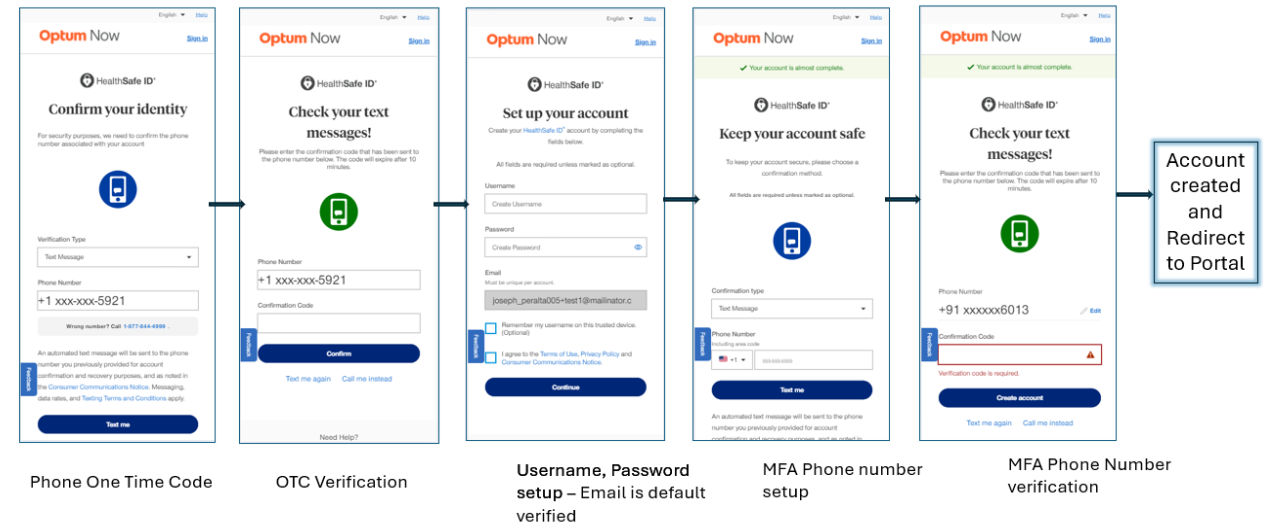
Standard Registration Flow: The Fast track registration process optimizes the registration process by automating and simplifying steps, ensuring a smooth experience for users. Here’s how it works:
- Generating the registration email link: The portal invokes the HSID API to generate a Fast Track Registration link. This URL encodes eligibility data and a secure token specific to the active member for 72 hours. This encrypted URL is then included in a registration email invite sent to the member to create a new HSID account or sign into an existing account.
Note: Phone Number is a mandatory field that needs to be provided by the portal.
Remarks | ||
Big 5 eligibility data | Example key fields (to be filled by portal):
a. Non-members: Require basic details such as first name, last name, email, and phone number. DOB is not required. b. Base members: Require basic details such as first name, last name, email, and DOB. | Used for conventional registration process. |
Stargate namespace | IIM | Allows access to the API for specific portal |
Open API Spec | - | |
Database | Database table ‘mbr_rgst_email’ is created in the OGN database | Stores information about the member required for registration through an email |
2. Completing registration and account setup: Upon clicking the registration link in the email, the system directs the member to the Security Authentication page. Aikyam will expose an API to generate and validate an OTC sent to members' cell phones. After OTC verification, members set up their account, skipping the problematic “Big 5” screen with Member ID/SSN/MBI number and set up their phone MFA. This ensures that members can directly proceed to create their username and password, bypassing the first step that frequently led to errors and registration failures.
Fast track registration Workflow for Optum Patient Portal
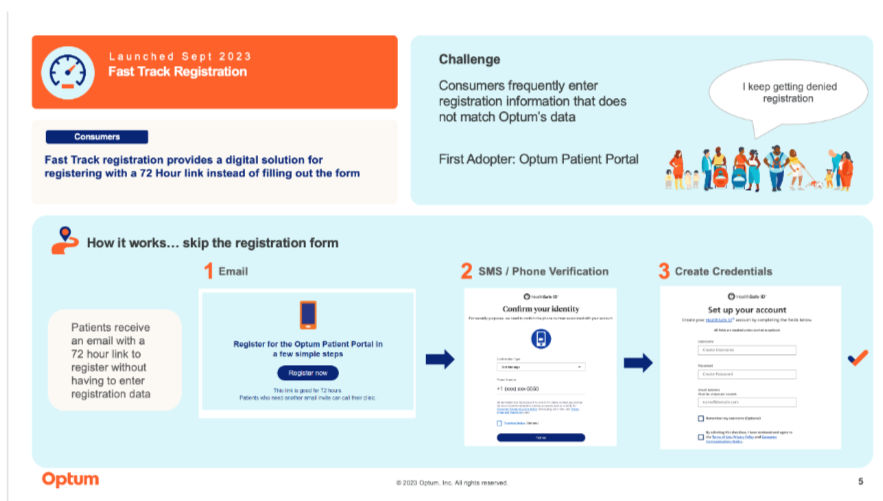
1. Fast track registration feature enhances registration success rates by pre-validating member details and bypassing error-prone initial steps, resulting in reduced error rates and a faster registration process. Business Value
2. This feature is highly customizable to meet specific client needs. For instance, we have integrated customized Fast track registration solutions into the Optum Rx member portal and the Optum Specialty Pharmacy portal, demonstrating its adaptability to various requirements.
3. Simple and easier registration process where the member only sets up his basic authentication (username, password, MFA) and redirects to the portal.
4. Migration of existing member accounts or data from other portals or system (Optum Store, EPIC).
Success Metrics
To evaluate the effectiveness of the Fast track registration (Fast track registration) feature, Key performance indicators are monitored through detailed analytics tracking.
1. Performance data is collected from both the portal and the HSID UI team using Adobe Analytics. This data includes tracking user interactions and registration completion rates.
2. The HSID backend team ensures proper logging of the member journey to capture detailed metrics, which are then processed through Splunk to assess user experience and feature performance.
Compliance and Security Considerations
Ensuring compliance with security protocols is critical for safeguarding user registration process. The following steps illustrate how our system upholds security and verifies user identity through advanced measures:
- HSID Encryption: HSID will store the data and generate a unique id which is cryptographically secure random number of 32 digits. This unique number will be appended to the registration link and will help uniquely identify a member when they click on registration link. This way PII data will never be exposed in the mail.
- OTP Authentication: Upon clicking the registration link, the member is directed to an OTP screen, where they can select their preferred method of receiving an OTP — either via a phone call or a text message. This process verifies their identity and confirms access to the registered mobile device.
- Session Management: The system stores a session ID in the browser. If an unauthorized actor attempts to misuse the registration link, repeated incorrect OTP entries will invalidate the link after five failed attempts. Furthermore, the registration link remains active only within a 72-hour window.
Risks and Mitigation Strategies
If the unauthorized actor attempts to register using the provided Fast track registration link and encounters an invalid OTP situation, the system allows up to four unsuccessful attempts before closing the browser. Upon reopening the browser, the attempt count resets. This behavior can potentially lead to repeated failed attempts.
Previous:
Improving user registration rates
Next:
Real-time activation
Share additional feedback to help us improve.
0/255
|
Powered by Aikyam @2025 All rights reserved

+1 866 451 2735
 +1 866 451 2735

+1 855 819 5909