

Last update:
Smart match
Aug 21, 2026
This section describes how the Smart match feature streamlines user registration by enabling members to enter any type of identifier in the input field, simplifying the process and improving the accuracy of member record identification.
Overview
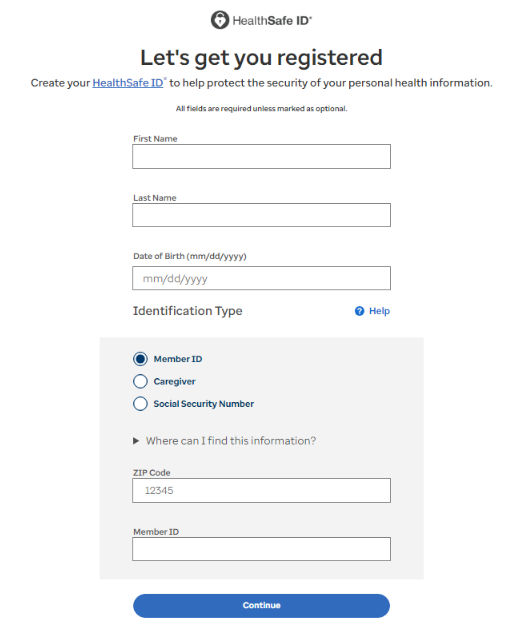
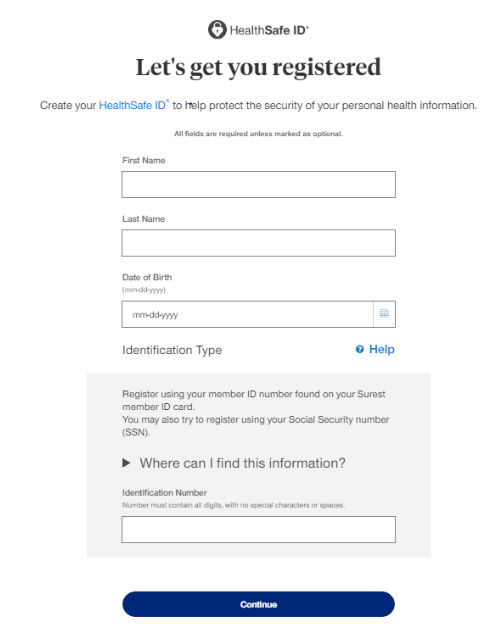
The Smart match feature simplifies user registration by allowing members to enter any identification type — such as Member ID, Social Security Number (SSN), Medicare Beneficiary Identifier (MBI), etc.— into a single input field. Members no longer need to remember specific identifiers or their formats. It optimizes the user interface and backend processes to simplify and improve the identification of the member’s golden record. This ensures a smoother user experience while maintaining secure member identification.
Features
- Unified Identifier Input Field: A single field replaces separate identification inputs (eg., Member ID, SSN, MBI etc.)
- Wildcard Search: Configurable smart search logic enables partial or complete identifier matching, handling leading zeros, non-alphanumeric characters, spaces and various other formats.Smart Match Logic:Identifier: 123456789-00 [checks all 14+ possible identifiers in User Service/EiMP]
- 123456789-00
- 123456789 00
- 12345678900
- 123456789-
- 123456789 & moreWild card Search => 123456789*
- Portal specific identifier formats and lengths are dynamically managed via configuration.
Problem statement
The registration process in the current portals requires members to choose specific identifier types (like Member ID, SSN, or MBI) and enter data into specific fields. They often entered incorrect or incomplete data as they had to remember specific IDs or formatting rules which led to increase the error rates. These mismatches between what members enter and the backend identifier formats often cause failures in identifying the member's golden record in the EIMP system.
Initial impacted personas and LOBs
- M&R
- MyUHC portals - Mobile & web
- AllSaver
- HouseCalls
- OnePass
- Optum Guide
- Surest
- UHC Hearing
- Decoupled portals support smart match by default
Description
The Smart Match feature in the registration portals is designed to enhance the accuracy and efficiency of identifying member records within the EiMP system.
Each portal has a unique configuration that allows customization of various Smart Match functionalities for both coupled and decoupled flows. For a detailed technical description, refer here.
Previous:
Real-time activation
Share additional feedback to help us improve.
0/255
|
Powered by Aikyam @2025 All rights reserved

+1 866 451 2735
 +1 866 451 2735

+1 855 819 5909