

Last update:
Remove users from the group
Aug 21, 2026
The user inherits all roles assigned to the group by default, as the auto-inheritance policy is enabled for all newly onboarded applications. To revoke a specific role from the user, you must remove the user from the group associated with that role.
- To delete a user from the group:
- In the left navigation pane, select Applications. Alternatively, you can select View Applications tile on the Dashboard.
- Go to the Access tile and click View & Update.
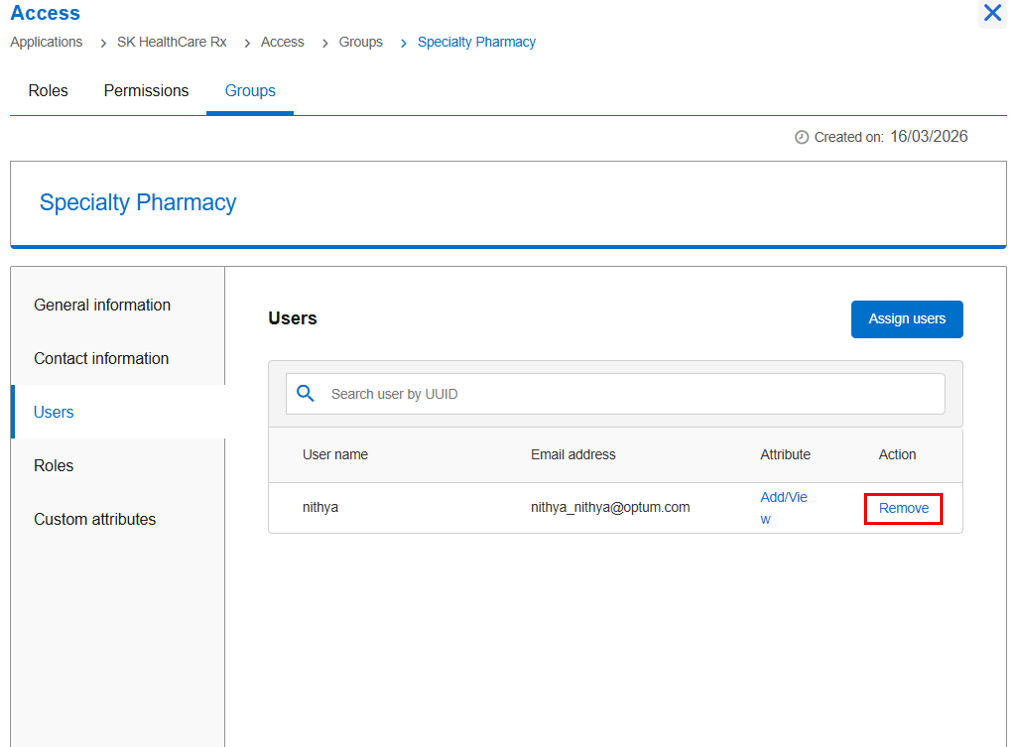
- Navigate to Groups, select a group name and then click Users.
- Search for the specific user by UUID.
- Under the Action column, click Remove.
Next:
Audit group memberships
Share additional feedback to help us improve.
0/255
|
Powered by Aikyam @2025 All rights reserved

+1 866 451 2735
 +1 866 451 2735

+1 855 819 5909