

Last update:
Set language preferences
Aug 21, 2026
System-generated communications (e.g., SMS, email) can be tailored to the user's preferred language. This ensures messages are delivered in a format that is easy for the user to understand. Language options vary depending on the tenant (e.g., HSID, OHID).
To set language preference:
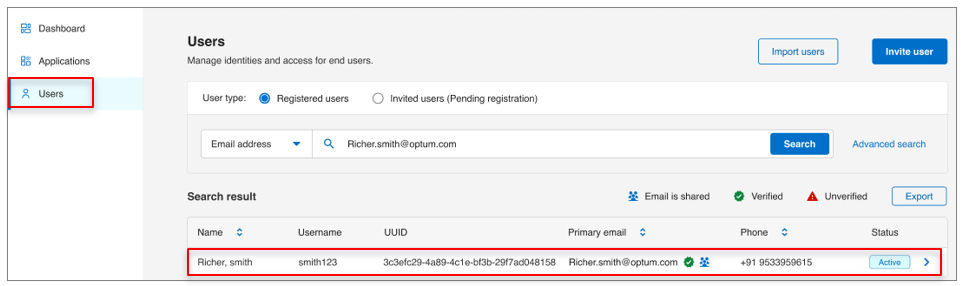
- Select Users from the left navigation pane.
- Use the search bar to find the user by name, email, or username, etc.
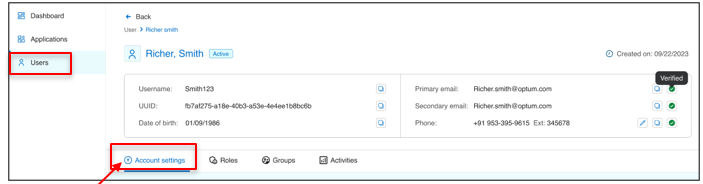
- Open the user profile and go to Account settings tab.
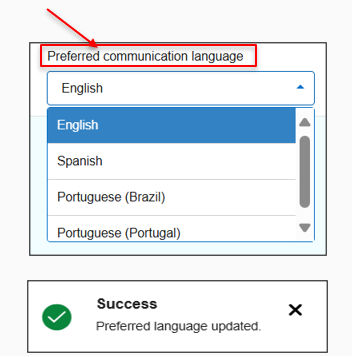
- Under Preferred communication language, open the dropdown and select the desired language.
Previous:
Reset user password
Next:
Manage governance
Share additional feedback to help us improve.
0/255
|
Powered by Aikyam @2025 All rights reserved

+1 866 451 2735
 +1 866 451 2735

+1 855 819 5909