

Last update:
HSID settings
Aug 21, 2026
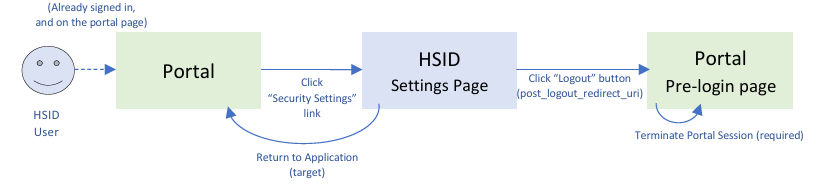
HSID Settings feature should be implemented by the application (portal) owner to enable HSID account holders to update email addresses, phone numbers, passwords, notification preferences, and manage passkeys.
Note: All query string values should be encoded, especially when its value is URL. Encoding prevents from stripping key=value pair provided to the original URL (target, post_logout_redirect_uri, etc).
Web
We navigate user directly to setting page URL:
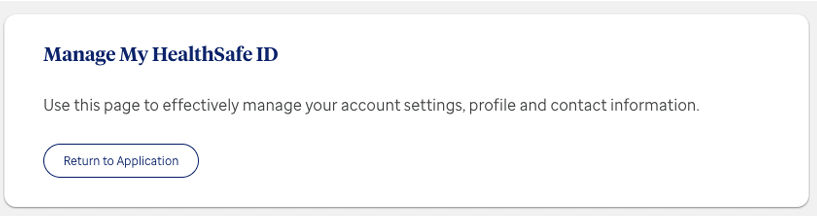
- target: an optional parameter but strongly recommended. target URL domain should match with one of the trusted domains of the application. If no target is specified, then the Application default target URL in OIDC configuration will be target (which is generally not a desired behavior, unless HSID settings page is opened in a different tab). HSID settings page will use specified or default target to redirect back to the portal owned page from HSID settings “Return to Application” button.
- post_logout_redirect_uri: an optional parameter but strongly recommended. HSID settings page URL can have post_logout_redirect_uri parameter, which can redirect the user to the 38 desired pre-login page and also portal can handle portal session termination on that page. For the details, please see Logout.
- ui_locales: an optional parameter to specify End-User’s preferred languages for the settings page. This parameter works the same as the standard OIDC specification. For the details, please see Multi language support section. The allowed locales are configured at the time of HSID onboarding (same as the general sign-in / registration OIDC). When this parameter is not provided or the value is not allowed / invalid, it falls back to the locale stored in HSID authenticated session, which is the latest-user-selected locale on HSID UI. This session-stored locale can be retrieved from ID token standard “locale” claim (HSID Aikyam EDA uses ISO 639-1 two letter codes), at the time of OIDC completion.
Note: If user’s Aikyam session expires (30 mins after the authentication), then link will take user to a generic HSID sign-in page. It is an edge case but not a desirable experience. Using the flow below (Mobile) can be an option if most users stay on the application longer than the expiration.
Mobile
We utilize Web Internal SSO Integration to re-instantiate Aikyam authenticated session and navigate to the settings page, in case Aikyam authenticated session is already expired. 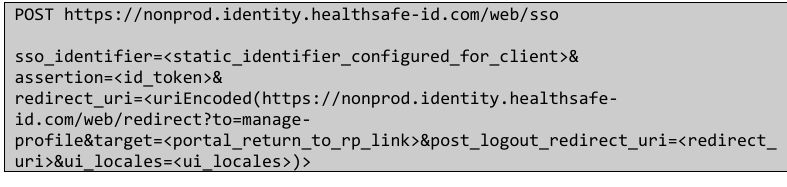
- assertion: ID Token that is returned from /oidc/token endpoint.
- target / post_logout_redirect_uri / ui_locales parameter in redirect_uri: See “Web” section above. Please note that the encoding is nested here, target / post_logout_redirect_uri has the encoded URL as its value, and once HSID Aikyam /web/redirect is constructed, this entire URL should be encoded and passed to redirect_uri parameter of /web/sso endpoint.
Next:
Logout
Share additional feedback to help us improve.
0/255
|
Powered by Aikyam @2025 All rights reserved

+1 866 451 2735
 +1 866 451 2735

+1 855 819 5909