

Last update:
Logout
Aug 21, 2026
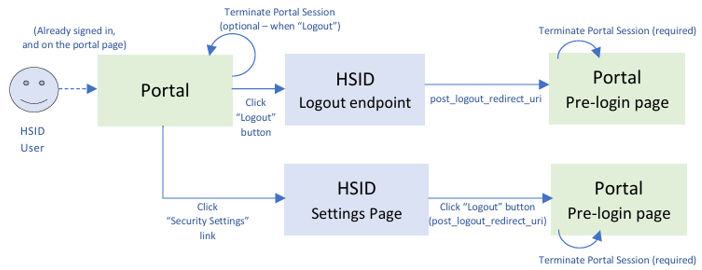
Logout from portal
Logout endpoint for Non-production Healthsafe ID is https://nonprod.identity.healthsafeid.com/oidc/logout
- id_token_hint: ID Token obtained in the earlier authentication process for the user.
- post_logout_redirect_uri: The user is redirected to this uri after the logout. it must be configured for the client in HSID and validated.
- state: OPTIONAL. Opaque value used by the RP to maintain state between the logout request and the callback to the endpoint specified by the post_logout_redirect_uri parameter. If included in the logout request, the OP passes this value back to the RP using the state parameter when redirecting the User Agent back to the RP. For the details of the state parameter, please see Using state parameter to control user’s landing location on portal.
This logout endpoint follows the OIDC RP-initiated logout specification. For more details refer https://openid.net/specs/openid-connect-rpinitiated-1_0.html#RPLogout
Logout from HSID settings page
HSID Settings URL can also have post_logout_redirect_uri parameter, that can be used to logout the user and also redirect them to the desired pre-login page. The URL provided to post_logout_redirect_uri parameter should be similar to Logout from portal’s post_logout_redirect_uri. For the entire structure of HSID Settings URL and how it works, please see HSID settings section.
Back-channel logout
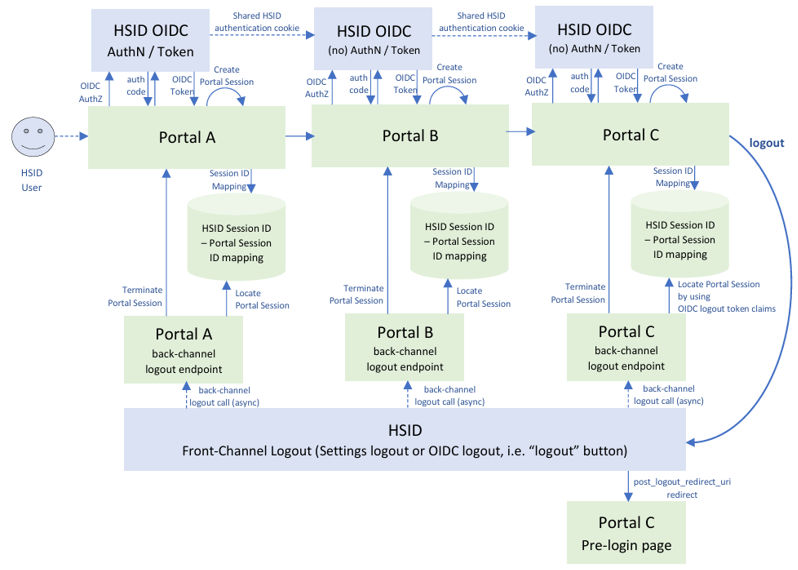
Back-channel logout (OIDC specification) allows the applications to terminate its session without using user-agent (e.g. browser cookie).
This is useful for the use cases described above, when the user hops from Portal A -> B -> C and logs out from Portal C. Portal C and HSID session terminations would be taken care of by RP initiated logout described in the previous section, however, Portal A or B sessions were not terminated in this process. Due to the security restrictions on the browser these days (Content security policy, Same-site cookie, Major Browser Products’ default security policies, etc), implementing back-channel logout provides the applications (in the example above, for Portal A and B) a reliable way to terminate their sessions regardless of where the user ends up logging out.
Another use case would be “IdP-initiated logout”, when IdP wants the user to logout from HSID and all visited applications (e.g. due to security violations, etc), HSID can terminate all application sessions using this back-channel logout endpoint calls.
For the back-channel logout implementation, application / portal owner needs to implement two things:
- Mapping of application session and HSID session
- Back-channel logout endpoint
Mapping between application session and HSID session
Whenever Application Session is created after HSID OIDC (authentication or registration) is completed, Application needs to store a mapping between its Application Session ID and HSID ID-token-provided information below:
- sid: HSID authentication session ID.
- sub: HSID uuid or Pairwise ID.
- iss: HSID IdP’s domain. (e.g. https://nonprod.identity.healthsafe-id.com).
- aud: HSID OIDC Client ID of your application.
sid is required for HSID Session to application session mapping. sub is useful for auditing / investigation purposes. iss is useful if your application uses non-HSID IdP together with HSID IdP, and wants to differentiate different IdPs in this mapping storage. aud is useful if your application handles multiple HSID OIDC client IDs at the same time.
This mapping will be used to locate your application session when your back-channel logout endpoint is executed upon logout. For the details, see the next section.
Back-channel logout endpoint
This is the endpoint called upon HSID logout, as you see in the diagram above. Once Application team has implemented this endpoint, HSID Implementation team registers your Application Back-channel Logout Endpoint in HSID client configuration, so that it will be called with async manner when the user logs out anywhere on the applications they ever hop around during their HSID authenticated session lifetime.
- HSID logout calls this back-channel logout endpoint by POST application/x-www-form urlencoded (see 2.5.), and logout_token is passed to this endpoint.
- Verify logout_token (see 2.6.)Note: HSID Logout Token would be JWS, and signature verification is exactly the same as ID token signature verification. The set of claims will be different, see the example in the next section.
- Find Application Session ID from the mapping (see previous section), then terminate Application Session (see 2.7.)Note: In the previous diagram, if your application is Portal C, post_logout_redirect_uri Portal C session termination and back-channel Portal C logout could happen at the same 42 time. Therefore, please consider graceful handling for both session terminations (OIDC Spec 2.7. says “If the identified End-User is already logged out at the RP when the logout request is received, the logout is considered to have succeeded.”)
- Return the response (see 2.8.)
- This endpoint needs to be publicly callable.
HSID logout token JWS: Header / payload example
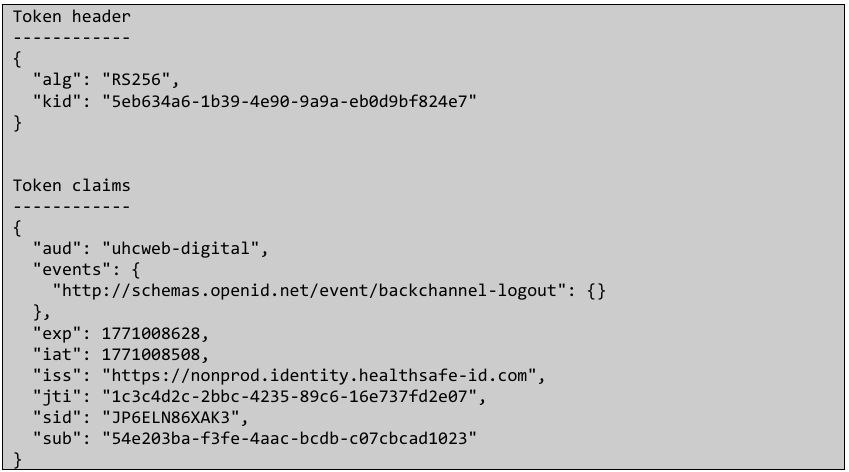
- aud: HSID OIDC Client ID of your Application.
- sid: HSID Authentication Session ID.
- sub: HSID uuid or Pairwise ID.
- iss: HSID IdP’s domain. (e.g. https://nonprod.identity.healthsafe-id.com).
Back-channel logout endpoint registration (HSID implementation team)
Once your application’s back-channel logout endpoint is on live, please contact HSID implementation team and register your back-channel logout endpoint in your application’s HSID client configuration.
Aikyam JWT tool
For unit test, sample Logout Token JWS generation, or JWS validation, please see Aikyam JWT tool.
Previous:
HSID settings
Share additional feedback to help us improve.
0/255
|
Powered by Aikyam @2025 All rights reserved

+1 866 451 2735
 +1 866 451 2735

+1 855 819 5909