

Last update:
Forgot password
Aug 21, 2026
To reset their password, a user should follow these steps: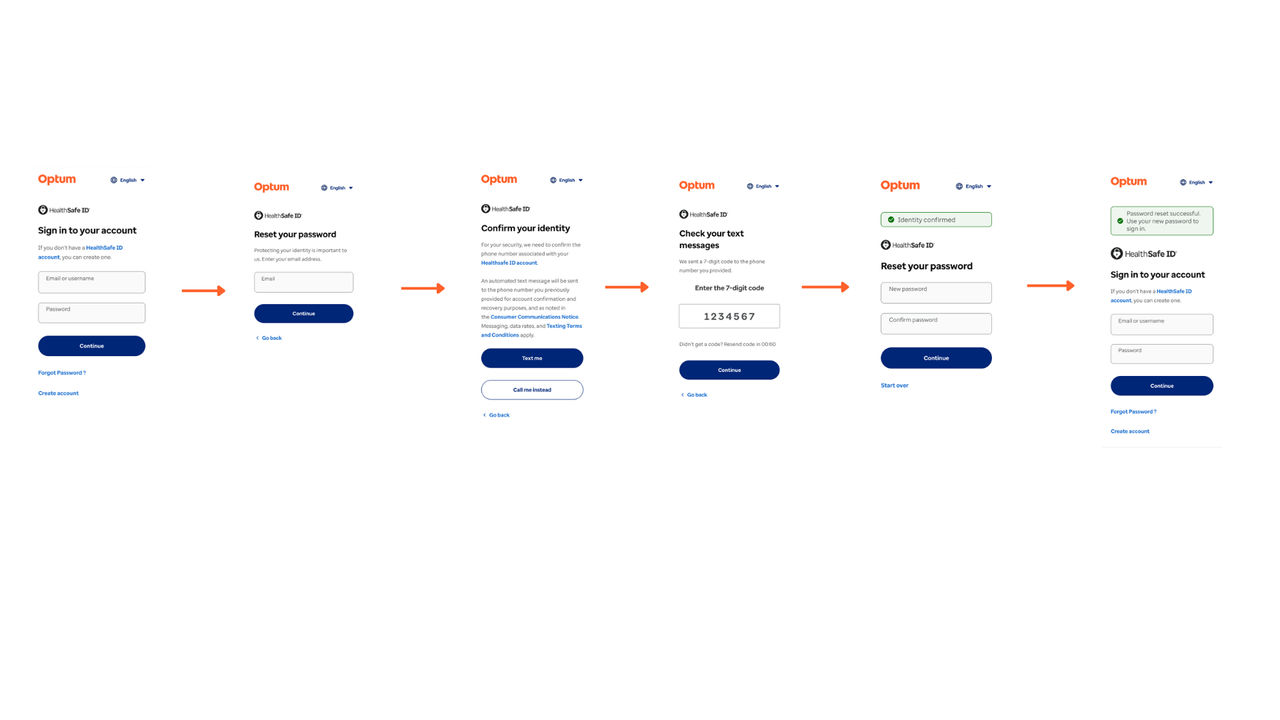
- The user clicks “Forgot Password?” on the login screen and navigates to the Reset Your Password screen.
- Email Verification: The user provides a registered email address.
- On the Confirm your Identity screen, the user selects one of two verification options (Text Me or Call Me Instead), receives a verification code via SMS or automated call, and enters the code in the provided field.
- The user enters and confirms the new password on the Reset Your Password screen.
Previous:
Account recovery
Next:
Member user experience
Share additional feedback to help us improve.
0/255
|
Powered by Aikyam @2025 All rights reserved

+1 866 451 2735
 +1 866 451 2735

+1 855 819 5909