

Last update:
Disable or enable an application
Aug 21, 2026
The identity platform allows administrators to enable or disable an application via the Aikyam Identity Console.
You can disable an application in scenarios involving potential security breach incidents to prevent new user registrations. This action does not revoke access for users who already have active accounts.
Steps
To disable the application,
- Sign in to the Aikyam Identity Console.
- In the left navigation pane, select Applications. Alternatively, you can select View Applications tile on the Dashboard.
- Select the application you want to disable.
- Go to the General Information tile and click View & Update.
- Go to the Basic Information tab, click Deactivate at the bottom, and enter the application name.
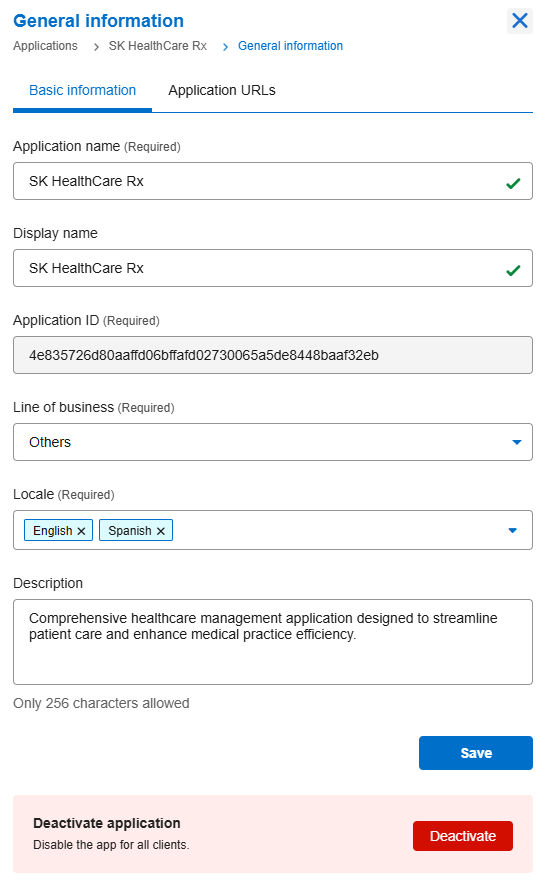
- Once deactivated, the application will no longer process authentication or authorization requests.
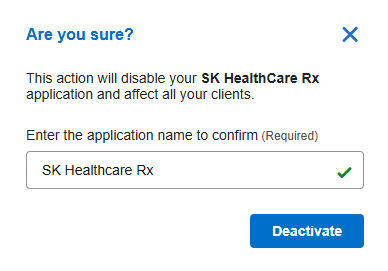
Important: Use this feature to restrict users from logging in or creating new accounts during a security incident.
Re-enable an application
You can activate an application in scenarios involving resolving a compliance issue, rolling back a temporary disablement for security patching, or addressing downtime.
Steps
To re-enable the application,
- Sign in to the Aikyam Identity Console.
- In the left navigation pane, select Applications. Alternatively, you can select View Applications tile on the Dashboard.
- Select the application you want to enable.
- Go to the General Information tile and click View & Update.
- Click Activate.

Previous:
Audit group memberships
Next:
Manage organizations
Share additional feedback to help us improve.
0/255
|
Powered by Aikyam @2025 All rights reserved

+1 866 451 2735
 +1 866 451 2735

+1 855 819 5909