

Last update:
Review roles and permissions
Aug 21, 2026
Review roles and permissions to ensure users have the correct access aligned with their responsibilities. This helps maintain compliance and enforce least-privilege principles.
Steps to review roles and permissions:
- Select Users from the left navigation pane.
- Use the search bar to find the user by name, email, or username, etc.
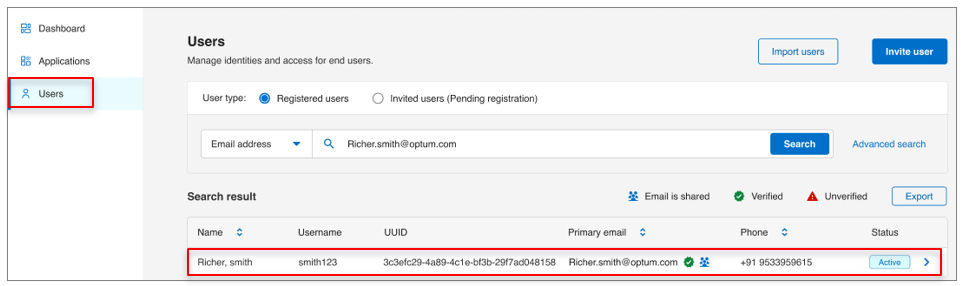
- Click the user’s name to open their profile.
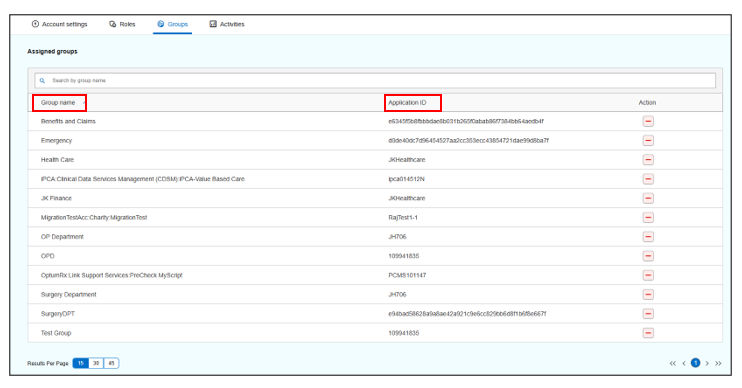
- Navigate to the Groups tab and identify the group associated with the user. Note the Group name and Application ID linked to that group.
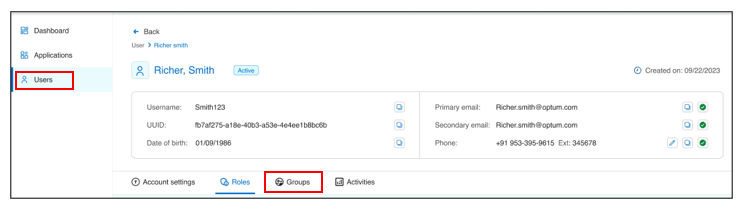
- Go to the Roles tab and use the Application dropdown to search for the recorded Application ID. This will display all roles assigned under that application.
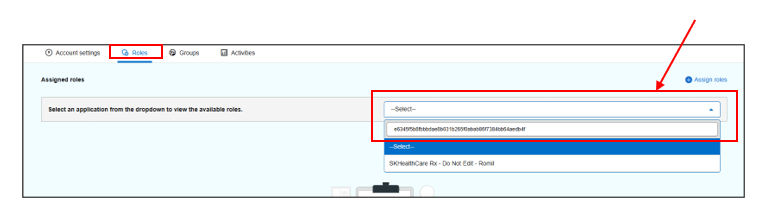
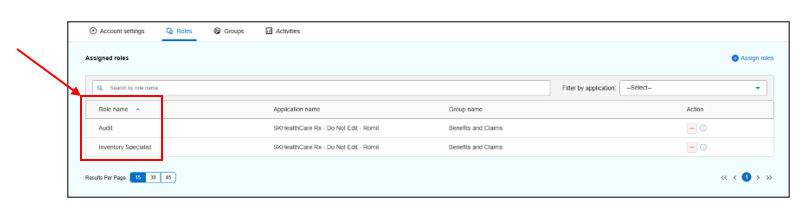
- Review:
- Application-level roles assigned to the user.
- Group-level roles inherited through memberships.
- Confirm that roles align with the user’s job function and compliance requirements.
Result
Note:
- Roles inherited from policy-on groups cannot be revoked individually. To adjust these, modify group membership.
- For policy-off groups, roles can be adjusted directly from the Roles tab.
Previous:
Manage governance
Next:
Review group memberships
Share additional feedback to help us improve.
0/255
|
Powered by Aikyam @2025 All rights reserved

+1 866 451 2735
 +1 866 451 2735

+1 855 819 5909