

Last update:
User details view
Aug 21, 2026
In the user details view, you can check the verification status for both email and phone number:
- Green check mark indicates verified
- Red check mark indicates unverified
- Blue icon indicates email is shared
Example (see image below):
The Primary and secondary email field shows a green indicator, meaning the email is verified, and the Phone field shows a red indicator, meaning the phone number is unverified.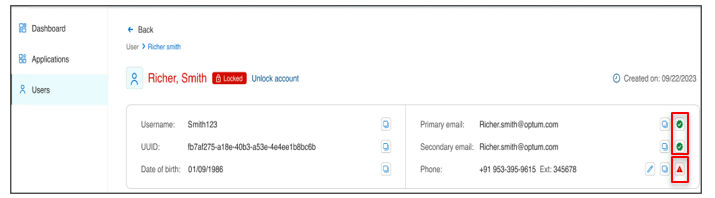
- If both methods (email and phone) are verified, you will see green indicators for both.
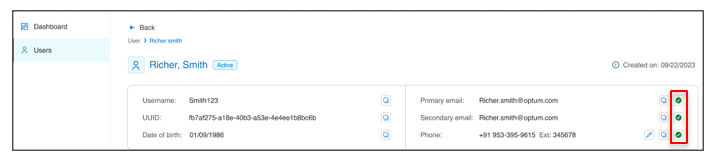
- If one email and one phone are verified, but one email is unverified, you will see two green indicators and one red indicator.

- If the primary email is a shared email, you will see a blue icon indicating that the email is shared.
Previous:
Search results view
Next:
Edit user profiles
Share additional feedback to help us improve.
0/255
|
Powered by Aikyam @2025 All rights reserved

+1 866 451 2735
 +1 866 451 2735

+1 855 819 5909