

Last update:
Mobile PKCE – OIDC (mobile app only)
Aug 21, 2026
Proof Key for Code Exchange (abbreviated PKCE, pronounced “pixie”) is an extension to the authorization code flow to prevent CSRF and authorization code injection attacks. The technique involves the client first creating a secret on each authorization request, and then using that secret again when exchanging the authorization code for an access token. This way if the code is intercepted, it will not be useful since the token request relies on the initial secret.
Authorization request
Client sends the code challenge with the authorization request
The steps to generate code challenges are described in the specification. The below is a short summary:
- Client Application generates a random string (43 – 128 bytes) with code_verifier allowed characters. This becomes a code_verifier. Keep this code_verifier in the application session, in order to send code_verifier later in token request.
- Create a SHA-256-hashed code_verifier, then base64url-encode it, that string becomes a code_challenge (always 43 bytes).
The client sends the code challenge as part of the OAuth 2.0 Authorization Request using the following additional parameters:
- code_challenge: REQUIRED. Base64url-encoded SHA-256-hashed code_verifier.
- code_challenge_method: REQUIRED. method is "S256"
Server returns the authorization code
When the server issues the authorization code in the authorization response, it MUST associate the "code_challenge" and "code_challenge_method" values with the authorization code so it can be verified later.
Error Response
If the server requires Proof Key for Code Exchange (PKCE) by OAuth public clients and the client does not send the "code_challenge" in the request, the authorization endpoint MUST return the authorization error response with the "error" value set to "invalid_request". The "error_description" or the response of "error_uri" SHOULD explain the nature of error, e.g., code challenge required.
Token Request
Client Sends the authorization code and the code verifier to the token endpoint
Upon receipt of the authorization code, the client sends the access token request to the token endpoint. In addition to the parameters, it sends the following parameter:
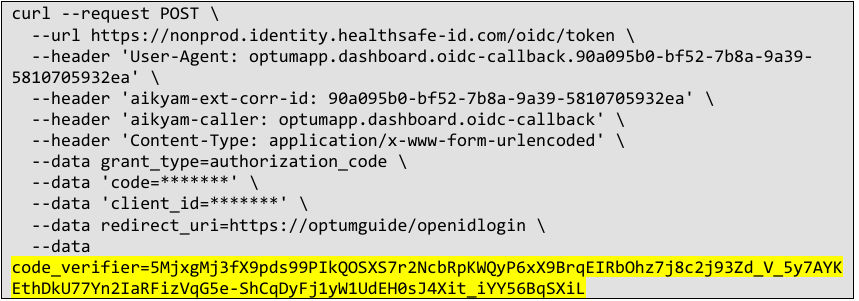
- code_verifier: REQUIRED. code_verifier should be generated at the time of Authorization Request. Seeabove .
The "code_challenge_method" is bound to the Authorization Code when the Authorization Code is issued. That is the method that the token endpoint MUST use to verify the "code_verifier".
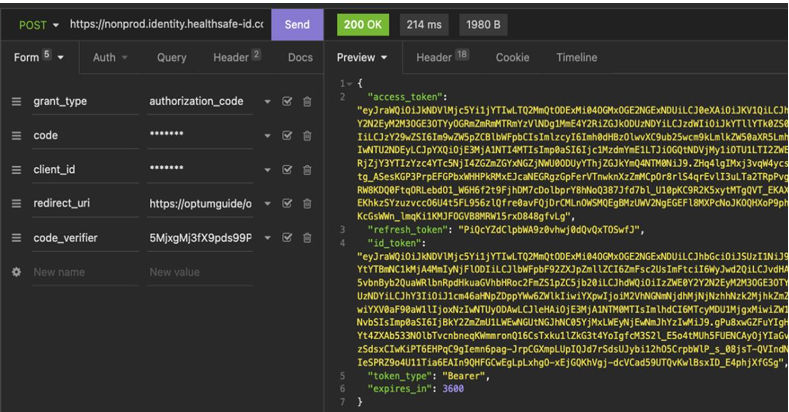
Server verifies code_verifier before returning the tokens
Upon receipt of the request at the token endpoint, the server verifies it by calculating the code challenge from the received "code_verifier" and comparing it with the previously associated "code_challenge", after first transforming it according to the "code_challenge_method" method specified by the client.
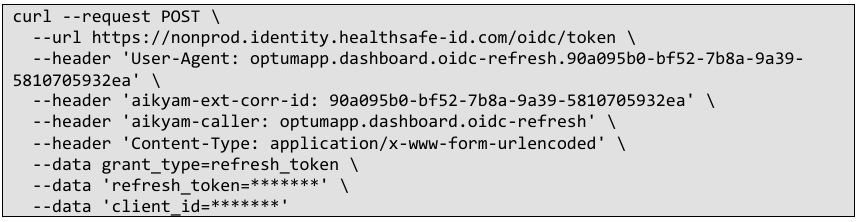
Refresh token request
Refresh token request can be made without client_secret for PKCE configured application.
How to generate “code_challenge” and “code_verifier” online for testing
The tool below is useful for generating code_verifier and code_challenge, when client application hasn’t implemented PKCE handling and/or the tester wants to test the OIDC Authorization / Token Request endpoint calls with PKCE, independently from the client.
Supporting associated domains (iOS app only)
HSID EDA Authentication / Registration UI shows up in either In-App browser or Webview of the native iOS application. To trust each other (Aikyam HSID EDA and iOS App) and perform seamless credential management, the registration of the information below is required.
IdP (Aikyam HSID EDA) – iOS app ID registration
HSID EDA needs to register your app in the trusted application list. Please share the information below to HSID implementation team.
iOS App – HSID EDA domain registration
iOS App needs to register Aikyam HSID EDA domain name. This is also important for migration from HSID legacy to HSID EDA, as HSID Legacy uses a different domain from HSID EDA.
- Associated domains entitlement (webcredentials domain, wildcard * can be used if needed, see the link)
Share additional feedback to help us improve.
0/255
|
Powered by Aikyam @2025 All rights reserved

+1 866 451 2735
 +1 866 451 2735

+1 855 819 5909