

Last update:
Deactivate users
Aug 21, 2026
Deactivate a user profile to temporarily suspend access due to inactivity, support requests, or policy requirements. The account remains intact and can be reactivated later without data loss.
To deactivate a user profile:
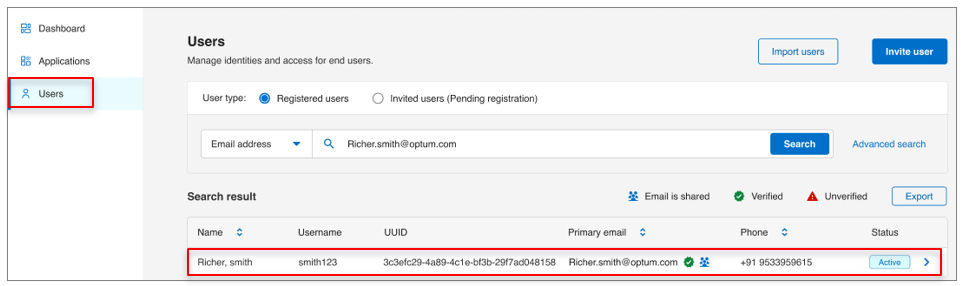
- Select Users from the left navigation pane.
- Use the search bar to find the user by name, email, or username, etc.
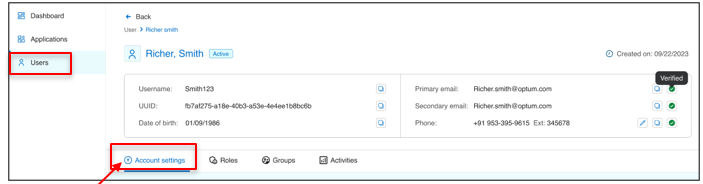
- Open the user profile and go to Account settings tab.
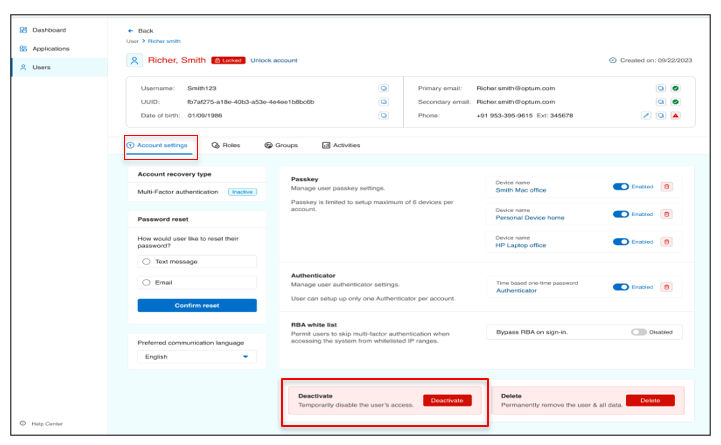
- Scroll to the bottom of the screen.
- Click Deactivate to apply changes.
- Enter the Incident ID and Reason when prompted.
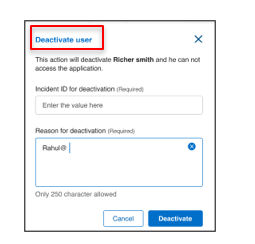
- Click Deactivate again to finish the action.
Result
Note: Deactivation is typically used for temporary access suspension.
Previous:
User deprovisioning
Next:
Unlock user profiles
Share additional feedback to help us improve.
0/255
|
Powered by Aikyam @2025 All rights reserved

+1 866 451 2735
 +1 866 451 2735

+1 855 819 5909