

Last update:
Import users
Aug 21, 2026
The Import users feature allows administrators to onboard multiple users at once by uploading a CSV file. Use this option to send bulk user invitations quickly and efficiently.
Steps to import users :
- Select Users from the left navigation pane.
- On the Users page, click Import users.
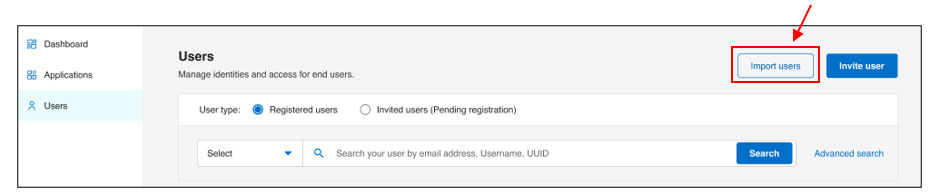
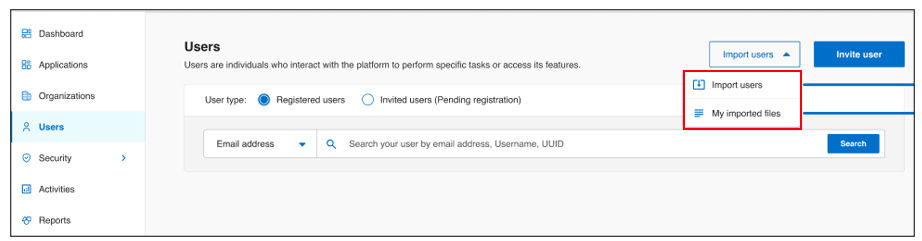
- A dropdown menu will appear with two options:
- Import users- to start a new user import
- My imported files- to view previously uploaded files and their status
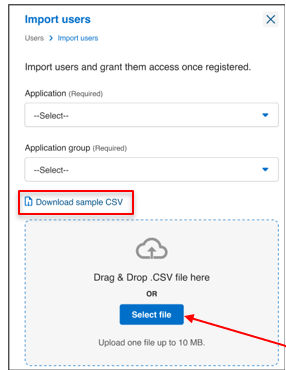
- If you choose Import users, a new screen will appear where you need to:
- Select the Application and Application group to associate with the users.
- Click Select file and upload a CSV file containing user details.
- Before submitting, ensure the CSV file meets the following requirements and includes all mandatory fields:
- Up to 50 attributes per user
- Maximum file size: 10 MB
- Maximum records per import: 50,000
- A sample CSV download link available in the UI with all the headers.
- Required fields:
- Username
- Last name
- Email address
- Invitation target URL (defines the endpoint users are redirected to after login).
- Role name (required only for policy-off applications).
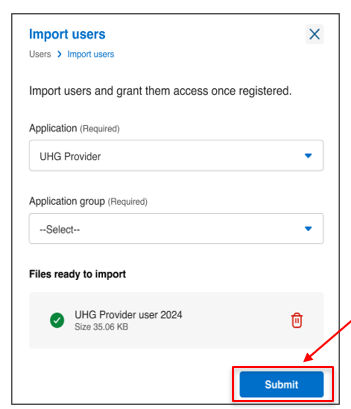
- Click Submit to initiate the import.
- The system will validate entries and flag any errors.
- If errors are found, an error summary will be displayed, and a downloadable report will be available for corrections.
-
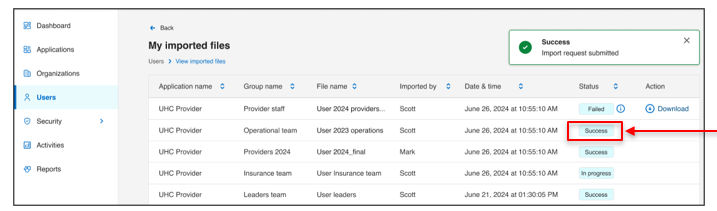
- If you choose My imported files, you will see a list of previously uploaded CSV files along with their status:
- In progress – records are being analysed by the system.
- Success – file uploaded successfully with no errors.
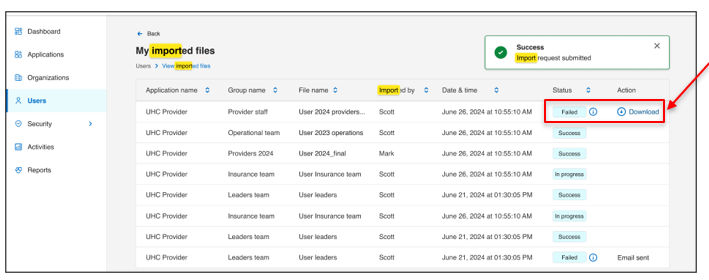
- Failed – Import fails when records have errors like mismatched entries, header issues, invalid data, or duplicates. Click Download to get the error file and review details.
Result
Note:
- This functionality is currently supported for OHID tenants only.
- Login callback URLs in application are treated as Invitation target URL in invite user / import users.
- For policy-on applications (directly onboarded to Aikyam), group auto-inheritance is enabled. Users automatically receive roles and permissions assigned to their group during onboarding.
- For policy-off applications (typically legacyApplications that were originally onboarded on Admin 1.0 and later transitioned to the current version.systems migrated into Aikyam), group inheritance is disabled by default. Roles must be explicitly specified during user onboarding.
Previous:
View and manage invitations
Next:
User authentication
Share additional feedback to help us improve.
0/255
|
Powered by Aikyam @2025 All rights reserved

+1 866 451 2735
 +1 866 451 2735

+1 855 819 5909