

Last update:
View and manage invitations
Aug 21, 2026
Track pending user invitations and take follow-up actions to ensure timely onboarding. You can view invitation details, resend or cancel invites, and monitor status changes from Pending registration to Registered.
Steps to view and manage invitations :
- Select Users from the left navigation pane.
- Click Invited users (Pending registration) to view all users who have been invited but not yet registered.
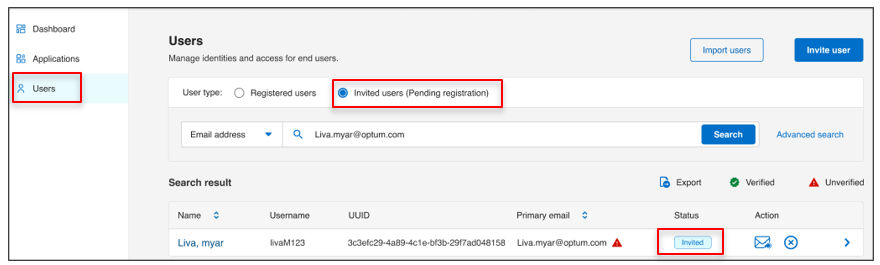
- For each invited user, you can:
- View invitation details including assigned roles and groups.
- Resend invitation if the user missed or did not receive the original email :
- From the Users screen, or
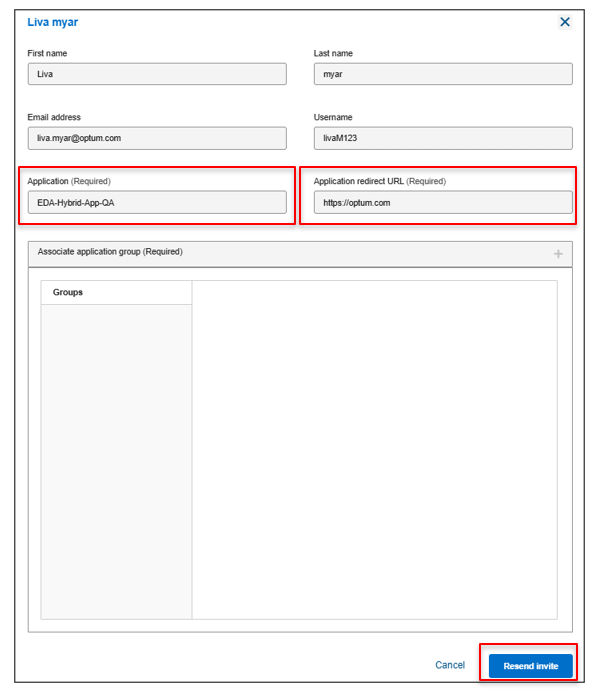
- Inside the individual user profile.
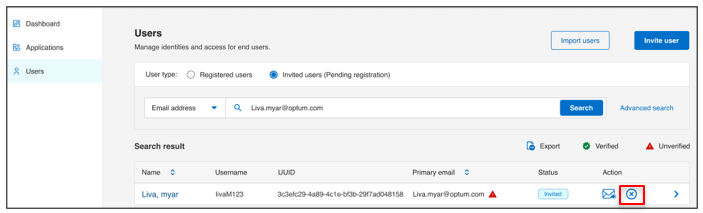
- Cancel invitation if the invite is no longer valid or needs to be revoked.
Result
Once the user completes registration and verifies their email, their status changes to Registered. At this point, administrators can:
- Assign additional roles
- Configure account settings
- Manage access controls
Note: This capability helps monitor onboarding progress and ensures timely follow-up on pending registrations.
Previous:
Invite user
Next:
Import users
Share additional feedback to help us improve.
0/255
|
Powered by Aikyam @2025 All rights reserved

+1 866 451 2735
 +1 866 451 2735

+1 855 819 5909