

Last update:
Export logs
Aug 21, 2026
Audit logs can be exported from the Activities tab for reporting and compliance purposes.
- Exports support the current filtered view.
- Exported logs are available in CSV format only.
- All available audit log columns are included in exported files, regardless of how many columns are currently displayed in the Activities grid.
- Export availability depends on the user’s assigned role:
- Support operation Tier 1 and Tier2 agents, and User enablement operation engineering roles can initiate both:
- Current results export
- All records export
- Application owner and Group owner roles can be initiated:
- Current results export only.
- Support operation Tier 1 and Tier2 agents, and User enablement operation engineering roles can initiate both:
- Export actions are subject to the applicable record limits for each export type.
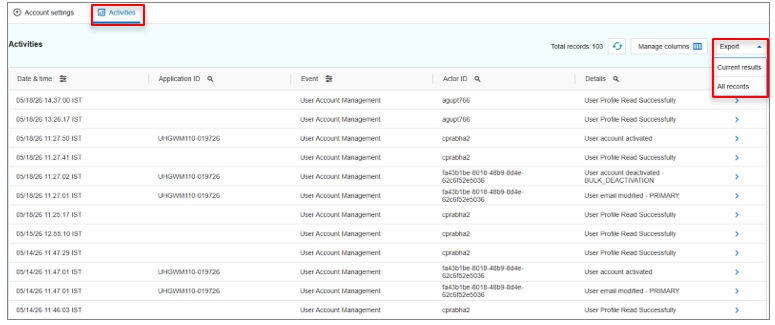
Users can use the following sections to understand export behavior, track export status, access previously generated files, and account for timing‑related considerations.
- Export options: Provides an overview of the available export types, including Current results and All records, and explains how record limits and data scope differ between them.
- Export processing and status: Explains how export requests are processed and how users can monitor export progress and completion status from the Reports page.
- Downloading previous exports: Explains how to access and download previously generated export files from the Reports page without re‑running an export.
- Export timing considerations: Explains how recent events and data synchronization affect export results, particularly for All records exports.
Note: Exported files include all audit log columns, even if some columns are hidden or not displayed in the Activities UI.
Previous:
Column descriptions and behavior
Next:
Export options
Share additional feedback to help us improve.
0/255
|
Powered by Aikyam @2025 All rights reserved

+1 866 451 2735
 +1 866 451 2735

+1 855 819 5909