

Last update:
Review group memberships
Aug 21, 2026
Review group memberships to understand inherited permissions and access context. Group memberships often determine application-level access and role inheritance, so reviewing them helps maintain compliance and prevent privilege escalation.
Steps to review group memberships:
- Select Users from the left navigation pane.
- Use the search bar to find the user by name, email, or username, etc.
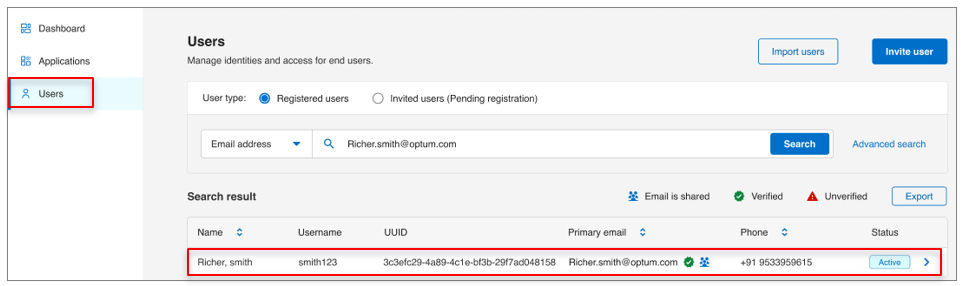
- Click the user’s name to open their profile.
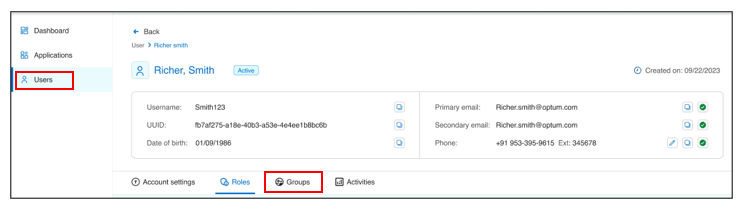
- Navigate to the Groups tab to view:
- All groups the user belongs to.
- Groups associated with specific Applications ID.
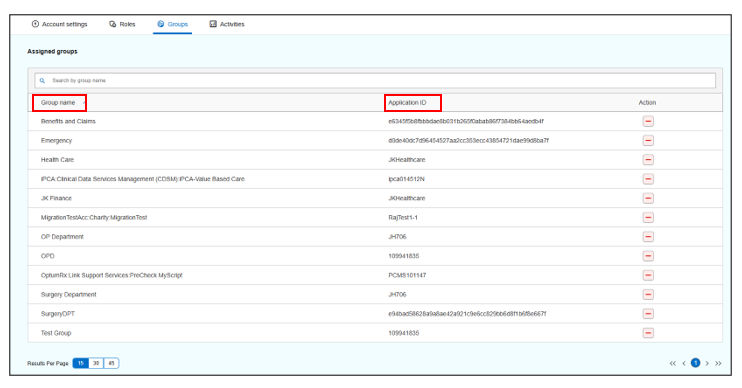
- Review :
- Direct group memberships assigned to the user.
- Nested or inherited memberships that may grant additional roles.
- Confirm that group memberships align with the user’s responsibilities and compliance requirements.
Result
Note:
- Membership in policy-on groups automatically assigns roles that cannot be revoked individually.
- To remove roles inherited from a group, you must remove the user from the group.
Previous:
Review roles and permissions
Share additional feedback to help us improve.
0/255
|
Powered by Aikyam @2025 All rights reserved

+1 866 451 2735
 +1 866 451 2735

+1 855 819 5909