

Last update:
Activate users
Aug 21, 2026
Activate a user profile to restore access when the account has been previously deactivated. This action allows the user to resume system usage without losing historical data or audit trails.
To activate a user profile:
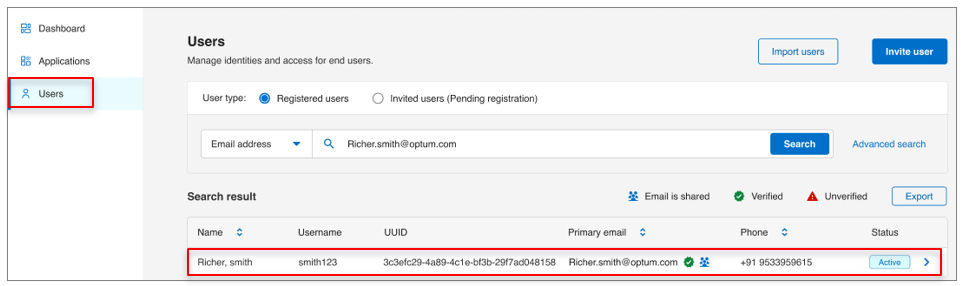
- Select Users from the left navigation pane.
- Use the search bar to find the user by name, email, or username, etc.
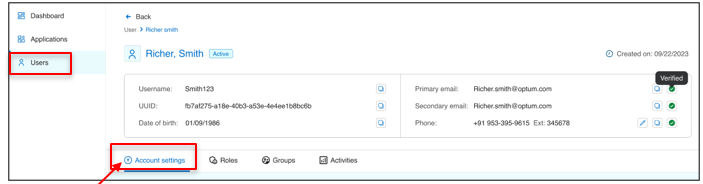
- Open the user profile and go to Account settings tab.
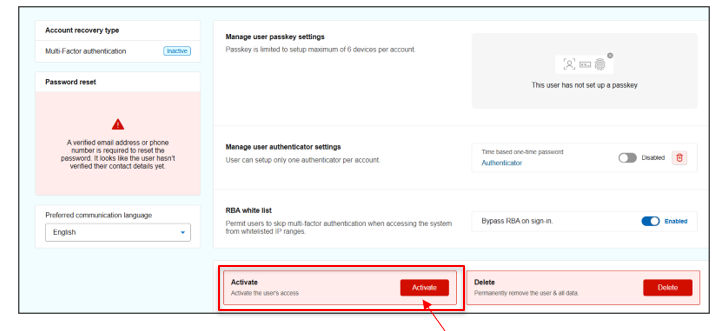
- Scroll to the bottom of the screen.
- Click Activate to apply changes.
Previous:
Delete users
Next:
Bulk action
Share additional feedback to help us improve.
0/255
|
Powered by Aikyam @2025 All rights reserved

+1 866 451 2735
 +1 866 451 2735

+1 855 819 5909