

Last update:
Downloading previous exports
Aug 21, 2026
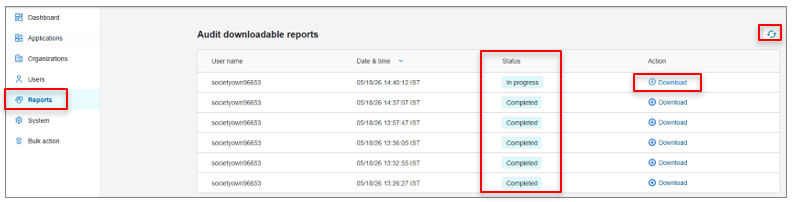
Previously generated exports remained available in the Reports tab. Users can download earlier export files without re-running the export.
To access previously generated exports directly:
- From the left navigation pane, select Reports.
- The Reports page displays the list of export requests along with their status (for example, in progress or completed).
- Once an export status is Completed, select Download to retrieve the file.
The refresh icon can be used to update the report status list.
Previous:
Export processing and status
Share additional feedback to help us improve.
0/255
|
Powered by Aikyam @2025 All rights reserved

+1 866 451 2735
 +1 866 451 2735

+1 855 819 5909